How to Use Google Analytics to Track Sales
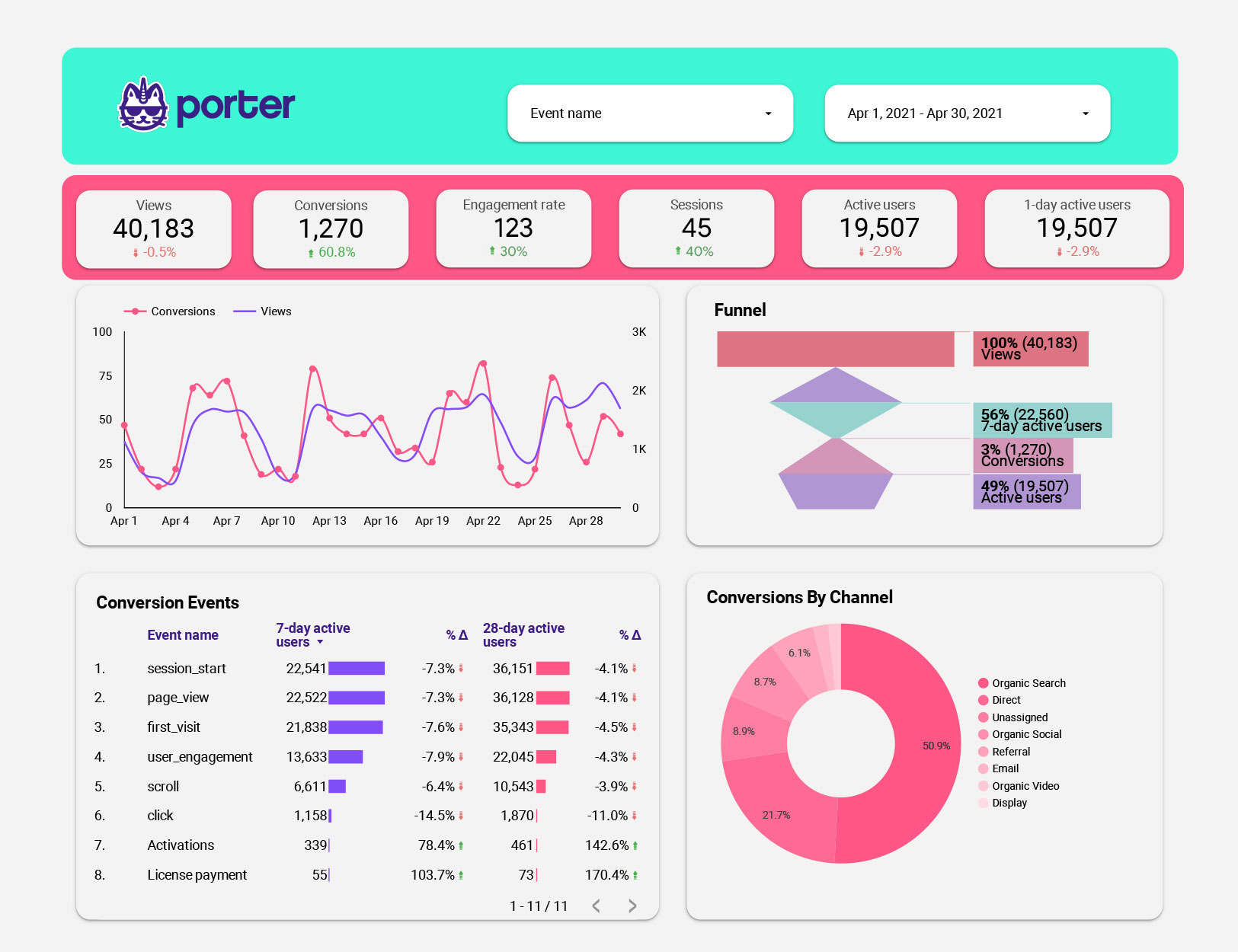
Unlock Your Sales Potential: A Beginner's Guide to Google Analytics Conversion Tracking
Hey friends! Ever feel like you’re throwing spaghetti at the wall with your marketing efforts, hoping something sticks and turns into a sale? You're pouring your heart, soul, and budget into your website, driving traffic like a Formula 1 driver, but then... crickets. The sales aren't reflecting the hustle. We've all been there, staring at our bank accounts, wondering where all the potential customers disappeared to. It's like inviting everyone to a party, but no one's hitting the dance floor, and the refreshments are just gathering dust. You're left scratching your head, asking, "Where did I go wrong?"
Well, what if I told you there's a secret weapon, a digital Sherlock Holmes that can track every click, scroll, and purchase on your website? It's called Google Analytics, and it's not just for geeks in hoodies anymore. Think of Google Analytics as your trusty sales radar, guiding you through the murky waters of online customer behavior. It transforms raw data into actionable insights, showing you exactly what's working, what's not, and where your customers are dropping off like flies. Without it, you're essentially flying blind, making decisions based on hunches instead of hard facts. Imagine trying to bake a cake without a recipe – you might end up with something edible, but chances are it won't be a masterpiece.
And let's be honest, in today's hyper-competitive online marketplace, guessing just doesn't cut it anymore. Your competitors are using data to optimize their campaigns, personalize their customer experiences, and ultimately, steal your potential sales. They're like seasoned chess players, anticipating your every move, while you're stuck playing checkers. So, are you ready to stop guessing and start knowing? This guide is your roadmap to mastering Google Analytics and turning those website visits into sweet, sweet sales. We'll break down the complexities into bite-sized pieces, so even if you think "analytics" sounds like a scary alien language, you'll be tracking conversions like a pro in no time. Stick with me, and let's unlock the secrets to turning your website into a sales-generating machine!
How to Use Google Analytics to Track Sales
Ready to dive in and turn Google Analytics into your sales-tracking superpower? Great! Let's break down the process into easy-to-follow steps. No tech jargon, just practical advice you can implement right away.
Getting Started with Google Analytics
Before you can track sales, you need to set up Google Analytics properly. Here's how:
• Create a Google Analytics Account: If you don't already have one, head over to the Google Analytics website and sign up using your Google account. It's free, so no excuses!
• Add Your Website: Once you're in, you'll need to add your website to Google Analytics. This involves providing your website's URL and some basic information about your business.
• Install the Tracking Code: This is the crucial step! Google Analytics will provide you with a unique tracking code (a snippet of Java Script). You need to paste this code into the
section of every page on your website. If you're using a platform like Word Press, Shopify, or Wix, there are usually plugins or integrations that make this process super easy. Think of it as planting a tiny sensor on each page to monitor visitor activity. Many themes have a dedicated area to insert Google Analytics Tag IDs.• Verify Your Installation: After installing the tracking code, go back to Google Analytics and verify that it's working correctly. Google Analytics should be able to detect your website and confirm that data is being collected.
Setting Up Conversion Tracking Goals
Now that Google Analytics is tracking your website traffic, it's time to define what "success" looks like. This is where conversion tracking goals come in:
• Define Your Goals: What actions do you want your website visitors to take? This could be completing a purchase, submitting a form, signing up for a newsletter, or even just spending a certain amount of time on your site. Be specific!
• Navigate to the Goals Section: In Google Analytics, go to Admin > Goals. This is where you'll create and manage your conversion goals.
• Create a New Goal: Click the "New Goal" button to start setting up your first conversion goal.
• Choose a Goal Template or Create a Custom Goal: Google Analytics offers several pre-built goal templates for common actions like making a purchase or submitting a contact form. You can also create a custom goal to track more specific actions.
• Configure Goal Details: This is where you define the criteria for your goal. For example, if you're tracking purchases, you'll need to specify the URL of your "thank you" page (the page customers see after completing a purchase). You can also assign a monetary value to each conversion, which is helpful for calculating your return on investment (ROI).
• Verify Your Goal: After setting up your goal, use the "Verify" option to make sure it's tracking correctly. This will give you an estimate of how many conversions you would have had in the past week based on your current traffic.
E-commerce Tracking: A Must-Have for Online Stores
If you're running an online store, enabling e-commerce tracking is absolutely essential. This allows Google Analytics to track detailed information about your sales, including revenue, products sold, and transaction IDs.
• Enable E-commerce Tracking: In Google Analytics, go to Admin > E-commerce Settings and turn on e-commerce tracking.
• Implement E-commerce Tracking Code: This requires adding a special set of code to your website that sends data about each transaction to Google Analytics. This code needs to be implemented on the "thank you" page or the order confirmation page. Again, if you're using a platform like Shopify or Woo Commerce, there are plugins that simplify this process.
• Explore E-commerce Reports: Once e-commerce tracking is set up, you'll have access to a wealth of valuable data in the E-commerce reports section of Google Analytics. You can see your total revenue, average order value, top-selling products, and much more.
Analyzing Your Data and Optimizing for Sales
Now that you're tracking conversions, it's time to start analyzing the data and using it to improve your sales performance.
• Identify Your Top-Performing Channels: Which marketing channels are driving the most sales? Are your customers coming from Google Ads, social media, email marketing, or organic search? Focus your efforts on the channels that are delivering the best results.
• Analyze Your Conversion Funnels: A conversion funnel is the path that customers take from their initial visit to your website to completing a purchase. Google Analytics allows you to visualize these funnels and identify where customers are dropping off. For example, are people abandoning their shopping carts at the checkout page? If so, you might need to simplify your checkout process or offer free shipping.
• Track Product Performance: Which products are selling well, and which ones are lagging behind? Use this information to optimize your product catalog, adjust your pricing, and improve your product descriptions.
• Segment Your Audience: Google Analytics allows you to segment your audience based on demographics, interests, and behavior. This can help you identify high-value customer segments and tailor your marketing messages accordingly.
• A/B Test Your Website: A/B testing involves creating two versions of a webpage (A and B) and then showing each version to a different group of visitors. This allows you to see which version performs better in terms of conversions. For example, you could A/B test different headlines, button colors, or product images.
Real-World Examples
Let's look at some concrete examples of how Google Analytics can help you improve your sales:
• Scenario 1: High Cart Abandonment Rate: You notice that a large percentage of your customers are adding items to their shopping carts but then abandoning them before completing the purchase. Using Google Analytics, you identify that the primary reason for this is a complicated checkout process. You simplify the checkout process by reducing the number of steps and offering guest checkout. As a result, your conversion rate increases by 15%.
• Scenario 2: Underperforming Product: You have a product that's not selling as well as you expected. Using Google Analytics, you discover that the product page has a high bounce rate (meaning people are leaving the page quickly). You realize that the product description is not compelling enough. You rewrite the product description, adding more details and highlighting the benefits of the product. As a result, sales of the product increase by 20%.
• Scenario 3: Ineffective Marketing Campaign: You're running a social media campaign to promote a new product. Using Google Analytics, you track the traffic and sales generated by the campaign. You discover that the campaign is driving a lot of traffic to your website, but it's not resulting in many sales. You realize that the landing page for the campaign is not optimized for conversions. You optimize the landing page by adding a clear call to action and improving the design. As a result, the conversion rate of the campaign increases by 10%.
By diligently monitoring your Google Analytics data and implementing data-driven changes, you can unlock significant improvements in your sales performance.
Pro Tips for Google Analytics Mastery
Want to take your Google Analytics skills to the next level? Here are some pro tips:
• Use Custom Dashboards: Create custom dashboards in Google Analytics to track the metrics that are most important to your business. This will give you a quick and easy overview of your key performance indicators (KPIs).
• Set Up Alerts: Configure custom alerts in Google Analytics to notify you when there are significant changes in your data. For example, you could set up an alert to notify you if your conversion rate drops by more than 10%.
• Integrate with Other Tools: Google Analytics can be integrated with other tools like Google Ads, Google Search Console, and your CRM system. This will give you a more holistic view of your marketing performance.
• Stay Up-to-Date: Google Analytics is constantly evolving, so it's important to stay up-to-date on the latest features and best practices. Follow the Google Analytics blog and attend webinars to learn new tips and tricks.
By implementing these pro tips, you'll be well on your way to becoming a Google Analytics master and driving significant growth for your business.
Common Questions About Google Analytics and Sales Tracking
• Q: Is Google Analytics GDPR compliant?
A: Yes, Google Analytics is GDPR compliant, but you need to make sure you're implementing it in a way that respects user privacy. This includes obtaining consent from users before tracking their data and providing them with the ability to opt out.
• Q: How accurate is Google Analytics data?
A: Google Analytics data is generally very accurate, but it's not perfect. There are several factors that can affect the accuracy of the data, such as ad blockers and users who have disabled tracking. However, the data is usually accurate enough to provide valuable insights into your website's performance.
• Q: How often should I check my Google Analytics data?
A: The frequency with which you check your Google Analytics data depends on your business and your goals. However, it's generally a good idea to check your data at least once a week to identify any trends or issues.
• Q: What's the difference between Google Analytics and Google Ads?
A: Google Analytics is a web analytics platform that tracks website traffic and user behavior. Google Ads is an advertising platform that allows you to run paid advertising campaigns on Google's search engine and other websites. Google Analytics can be used to track the performance of your Google Ads campaigns, but they are two separate tools.
So there you have it, friends! You’ve now got the keys to unlock the treasure trove of insights Google Analytics offers, specifically how it can supercharge your sales tracking. We’ve walked through everything from setting up your account to analyzing data and optimizing your efforts. Remember, the power of Google Analytics lies not just in collecting data, but in understanding it and using it to make smarter decisions.
It's time to put your newfound knowledge into action! Log in to your Google Analytics account, revisit your goals, and start exploring the reports. Identify those underperforming areas, optimize your funnels, and watch your sales climb. Don't be afraid to experiment and try new things – that's how you'll discover what works best for your business.
Are you ready to transform your website into a sales-generating machine?

Post a Comment for "How to Use Google Analytics to Track Sales"
Post a Comment