How to Use Google Analytics to Track Sales
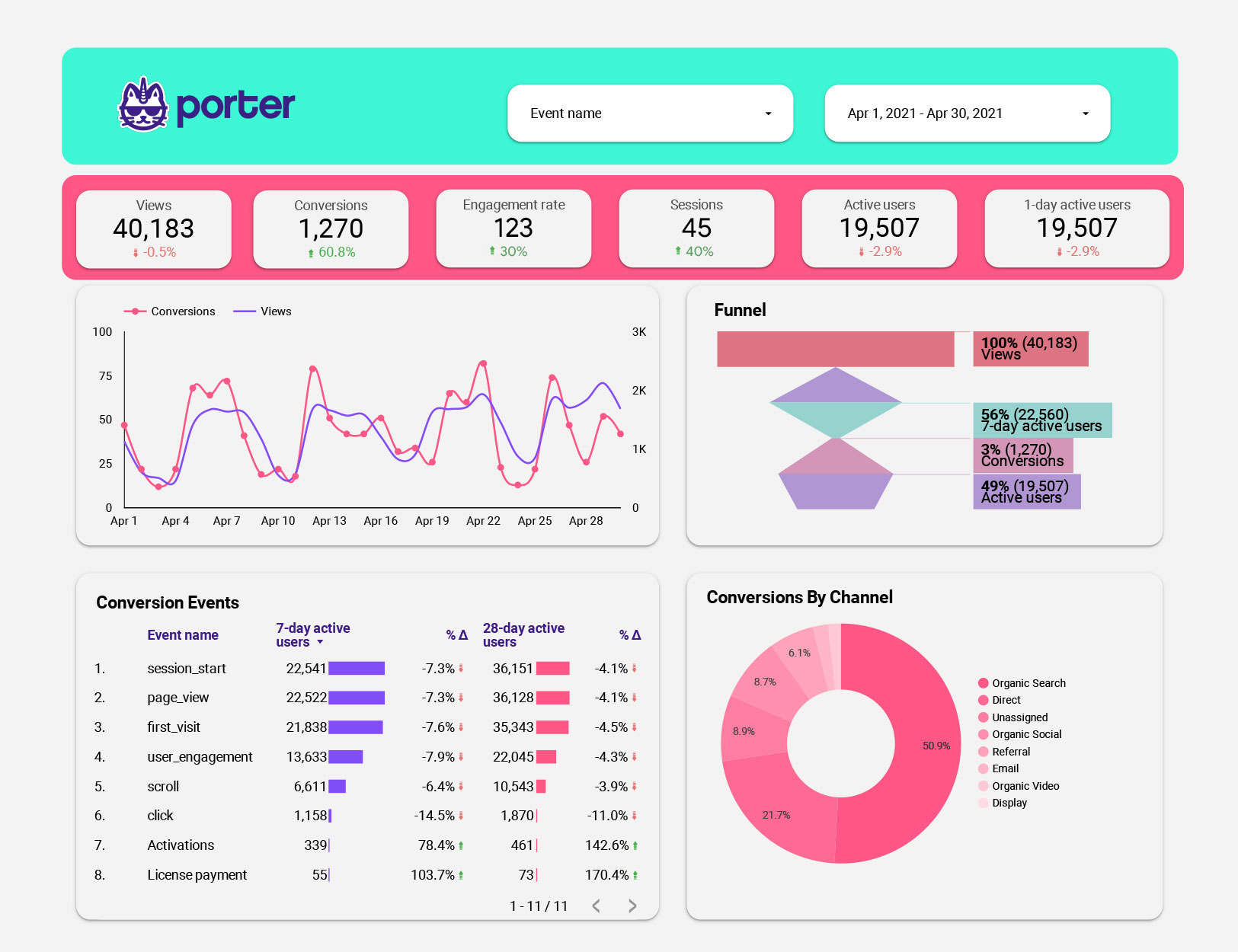
Unlock Your E-Commerce Potential: A Guide to Tracking Sales with Google Analytics
Alright, friends! Ever feel like you're throwing spaghetti at the wall to see what sticks in your online store? You're pouring time, energy, and probably a good chunk of your marketing budget into driving traffic, but figuring out if all that effort actually translates to sales can feel like deciphering ancient hieroglyphics. You're not alone! Many e-commerce businesses face the frustrating challenge of connecting their marketing efforts to their bottom line. We've all been there, staring at website traffic numbers, wondering if those visitors are actually turning into paying customers. Are your social media ads doing their job? Is your SEO strategy actually boosting sales? Or are you just spinning your wheels, burning cash, and getting nowhere fast? The truth is, without proper tracking, you’re flying blind. You’re making decisions based on guesswork instead of data, and that’s a recipe for disaster in the competitive world of e-commerce.
Think about it: imagine you're running a lemonade stand. You notice lots of people walking by, but your sales aren't booming. Do you keep making lemonade the same way? Probably not! You'd start observing. Are people stopping at the stand across the street because they have better signs? Are kids complaining your lemonade is too sour? You’d adjust based on what you see. Online, Google Analytics is your lemonade-stand observation deck, and tracking sales is how you figure out what's making people thirsty for your product. It's like having a secret agent working 24/7, gathering intel on your customers' behavior. Where are they coming from? What are they clicking on? What’s stopping them from hitting that “buy” button? Knowing these answers allows you to make smarter decisions, optimize your marketing campaigns, and ultimately, boost your sales. It gives you the power to understand the entire customer journey, from the moment they land on your website to the second they complete a purchase. This understanding is crucial for identifying areas for improvement and maximizing your return on investment (ROI).
But let's be honest, diving into Google Analytics can feel like navigating a complex maze. All those reports, metrics, and dashboards can be overwhelming, especially if you're not a data scientist. Where do you even start? Which metrics are the most important for tracking sales? How do you set up goals and conversions? How do you make sense of all the data and turn it into actionable insights? Don't worry; we're here to guide you through the process, step by step. We'll break down the jargon, demystify the dashboards, and show you exactly how to use Google Analytics to track your sales like a pro. Think of us as your friendly neighborhood data nerds, here to help you unlock the power of your website data and transform it into a sales-generating machine. By the end of this guide, you’ll not only understand how to track sales with Google Analytics, but you’ll also be able to use that data to optimize your website, improve your marketing campaigns, and ultimately, grow your business. So, are you ready to stop guessing and start knowing? Let's dive in and uncover the secrets to e-commerce success, one data point at a time. What if I told you there were hidden pathways in your analytics account leading straight to increased revenue?
Unleash Your Sales Potential with Google Analytics
Friends, let's face it: Google Analytics can seem like a beast. But once you tame it, it becomes your best friend for understanding customer behavior and, most importantly, boosting those sales! So, grab your metaphorical whip and chair; we’re going hunting for insights.
Setting the Stage: Google Analytics Basics
Before we dive into the specifics of tracking sales, let's ensure we're all on the same page with the basics. Google Analytics is a web analytics service that tracks and reports website traffic. It provides a wealth of information about your website visitors, including their demographics, interests, behavior, and the devices they use. This data is invaluable for understanding how users interact with your website and identifying areas for improvement.
•Understanding the Google Analytics Interface:The Google Analytics interface is divided into several sections, including the Realtime, Audience, Acquisition, Behavior, and Conversions reports. Each section provides different insights into your website traffic. The Realtime report shows you what's happening on your website right now, while the Audience report provides information about your website visitors, such as their demographics and interests. The Acquisition report shows you where your website traffic is coming from, while the Behavior report provides insights into how users interact with your website. Finally, the Conversions report allows you to track goals and e-commerce transactions.
•Ensuring Proper Google Analytics Installation:The first step to tracking sales with Google Analytics is to ensure that it's properly installed on your website. This involves adding the Google Analytics tracking code to every page of your website. You can do this manually by adding the code directly to your website's HTML, or you can use a plugin or tag management system like Google Tag Manager.
•Setting Up Goals:Goals are specific actions that you want users to take on your website, such as subscribing to your newsletter, filling out a contact form, or making a purchase. Setting up goals in Google Analytics allows you to track the completion rate of these actions and identify areas where you can improve the user experience.
E-Commerce Tracking: The Key to Sales Insights
Now, let's get to the heart of the matter: e-commerce tracking. This feature allows you to track sales transactions directly within Google Analytics, providing valuable insights into your revenue, product performance, and customer behavior.
•Enabling E-Commerce Tracking:To enable e-commerce tracking, you'll need to modify your Google Analytics tracking code to include information about each transaction, such as the product name, price, quantity, and transaction ID. This can be done manually by adding the code directly to your website's code, or you can use an e-commerce platform plugin that automatically handles this for you.
•Implementing Enhanced E-Commerce:Enhanced E-Commerce takes e-commerce tracking to the next level by providing even more detailed information about your customers' shopping behavior. With Enhanced E-Commerce, you can track product impressions, product clicks, add-to-cart events, checkout steps, and more. This allows you to identify bottlenecks in your sales funnel and optimize your website for conversions. For example, if you notice that a lot of users are adding a particular product to their cart but not completing the purchase, you can investigate potential issues with the checkout process or pricing.
•Tracking Product Performance:One of the most valuable benefits of e-commerce tracking is the ability to track the performance of individual products. You can see which products are selling well, which products are not, and which products are generating the most revenue. This information can help you make informed decisions about product pricing, promotion, and inventory management.
•Understanding the Sales Funnel:E-commerce tracking allows you to visualize your sales funnel and identify areas where users are dropping off. This can help you pinpoint problems with your website's design, navigation, or checkout process. For example, if you notice that a lot of users are abandoning their carts on the shipping page, you can investigate whether your shipping costs are too high or if the shipping options are not convenient for your customers.
Beyond the Basics: Advanced Strategies for Sales Tracking
Once you've mastered the basics of e-commerce tracking, you can start exploring more advanced strategies to gain even deeper insights into your sales performance. Think of this as leveling up your Google Analytics game.
•Setting Up Custom Dimensions:Custom dimensions allow you to track additional information about your website visitors or their behavior that is not automatically tracked by Google Analytics. For example, you can track the customer's lifetime value, their membership status, or the type of product they purchased. This information can be used to segment your audience and personalize your marketing campaigns.
•Using Segments to Analyze Data:Segments allow you to isolate specific groups of users based on their demographics, behavior, or other characteristics. For example, you can create a segment of users who purchased a specific product or who visited a specific page on your website. This allows you to analyze the behavior of these users in more detail and identify patterns that you might otherwise miss.
•Attribution Modeling:Attribution modeling is the process of assigning credit for sales to different marketing channels. For example, if a customer clicks on a Google ad, then visits your website organically, and then makes a purchase, which marketing channel should get the credit for the sale? Google Analytics offers several different attribution models, each of which assigns credit differently. Understanding the different attribution models can help you make informed decisions about your marketing budget allocation.
•Integrating Google Analytics with Other Tools:Google Analytics can be integrated with other marketing tools, such as Google Ads, Google Search Console, and your e-commerce platform. This allows you to share data between these tools and gain a more holistic view of your marketing performance. For example, integrating Google Analytics with Google Ads allows you to track the performance of your ad campaigns and optimize them for conversions.
•Leveraging Data-Driven Insights for Optimization:The ultimate goal of tracking sales with Google Analytics is to use the data to optimize your website and marketing campaigns for better results. This involves constantly analyzing your data, identifying areas for improvement, and testing different strategies to see what works best. For example, you can test different website designs, different ad copy, or different pricing strategies to see which ones lead to the most sales.
•Creating Custom Dashboards:Custom dashboards let you create personalized views of your most important sales metrics. This is like having a mission control center for your e-commerce business. You can track key performance indicators (KPIs) like revenue, conversion rate, average order value, and customer acquisition cost, all in one place. Regularly monitoring your custom dashboards will help you quickly identify trends and potential problems, allowing you to take proactive steps to improve your sales performance.
•Analyzing User Behavior Flow:The Behavior Flow report visually maps the paths users take through your website. By analyzing this report, you can identify common navigation patterns, discover pages where users are dropping off, and optimize your website's structure for better user experience. For instance, if you notice that many users are leaving your website after visiting a specific product page, you might consider improving the page's design, adding more compelling product descriptions, or offering a discount to encourage purchases.
•Monitoring Mobile Performance:With the increasing popularity of mobile shopping, it's crucial to monitor your website's performance on mobile devices. Google Analytics provides detailed insights into mobile traffic, conversion rates, and user behavior. By analyzing this data, you can identify areas where you can improve the mobile shopping experience, such as optimizing your website's design for smaller screens, streamlining the checkout process, or offering mobile-specific promotions.
Real-World Examples: Seeing Google Analytics in Action
Let's bring this to life with a few real-world examples. Imagine you run an online clothing store.
•Scenario 1:Identifying a Drop-Off Point: You notice a significant drop-off rate on your checkout page. Using Google Analytics, you discover that many users are abandoning their carts because of high shipping costs. By offering free shipping on orders over a certain amount, you can reduce cart abandonment and increase sales.
•Scenario 2:Optimizing Product Pages: You analyze your product performance data and find that one particular product has a low conversion rate. After investigating, you realize that the product description is unclear and the images are low-quality. By improving the product description and adding high-quality images, you can increase the product's conversion rate.
•Scenario 3:Targeting High-Value Customers: You use custom dimensions to track customer lifetime value and discover that a small percentage of your customers are responsible for a large portion of your revenue. By targeting these high-value customers with personalized marketing campaigns, you can increase their loyalty and drive even more sales.
Troubleshooting Common Issues
Even with the best planning, you might encounter some challenges along the way. Here are a few common issues and how to troubleshoot them.
•Data Discrepancies:Sometimes, the data in Google Analytics may not match the data in your e-commerce platform. This can be caused by various factors, such as incorrect tracking code implementation, data sampling, or differences in attribution models. To resolve this, ensure that your tracking code is properly installed, use unsampled reports, and understand the limitations of different attribution models.
•Missing Data:If you're not seeing any data in your Google Analytics reports, it could be because your tracking code is not properly installed or because your website is not generating any traffic. To resolve this, double-check your tracking code implementation and make sure that your website is receiving traffic.
•Incorrect Data:If you're seeing incorrect data in your Google Analytics reports, it could be because your tracking code is misconfigured or because your website is sending incorrect data to Google Analytics. To resolve this, double-check your tracking code configuration and ensure that your website is sending the correct data.
Frequently Asked Questions
Let's tackle some common questions to ensure you're on the right track.
•Question 1: How often should I check my Google Analytics data? Answer: Ideally, you should check your Google Analytics data at least once a week to monitor your sales performance and identify any potential issues. However, you may want to check it more frequently during peak seasons or promotional periods.
•Question 2: What are the most important metrics to track for e-commerce? Answer: The most important metrics to track for e-commerce include revenue, conversion rate, average order value, customer acquisition cost, and bounce rate. These metrics provide a comprehensive view of your sales performance and help you identify areas for improvement.
•Question 3: How can I use Google Analytics to improve my SEO? Answer: Google Analytics can help you improve your SEO by providing insights into your website's organic traffic, keyword performance, and user behavior. By analyzing this data, you can identify opportunities to optimize your website for search engines and attract more organic traffic.
•Question 4: Is Google Analytics enough, or do I need other tools? Answer: Google Analytics is a powerful tool, but it may not be enough for all your needs. Depending on your business, you may also need other tools, such as a CRM, an email marketing platform, or a social media management tool. These tools can provide additional insights and help you manage your marketing efforts more effectively.
In conclusion, tracking sales with Google Analytics is an essential part of running a successful e-commerce business. By following the steps outlined in this guide, you can gain valuable insights into your customers' behavior, optimize your website for conversions, and ultimately, boost your sales. So, grab your metaphorical magnifying glass, dive into your data, and start unlocking your e-commerce potential!
Turning Data into Dollars: Your Next Steps
Alright, friends, we've covered a lot! We've journeyed through the Google Analytics landscape, learned how to set up e-commerce tracking, explored advanced strategies, and even tackled some common issues. The key takeaway? Google Analytics isn't just a tool; it's a strategic weapon in your e-commerce arsenal.
To recap, we dove into:
• Setting up Google Analytics and ensuring it's properly installed.
• Enabling E-commerce tracking and understanding the power of Enhanced E-commerce.
• Tracking product performance to identify your stars and underperformers.
• Visualizing the sales funnel to pinpoint drop-off points and optimize the customer journey.
• Exploring advanced strategies like custom dimensions, segments, and attribution modeling.
• Integrating Google Analytics with other tools for a holistic view of your marketing efforts.
• Analyzing user behavior flow to improve website navigation and user experience.
• Monitoring mobile performance to cater to the growing mobile shopping audience.
• Troubleshooting common issues to ensure accurate data and reliable insights.
But knowledge without action is just information. Now it's your turn to transform this knowledge into tangible results. Here's your call to action:
Take Action: Dedicate one hour this week to review your Google Analytics setup and implement at least one of the strategies we discussed. Start with something simple, like enabling Enhanced E-commerce or setting up a custom dashboard to track your key performance indicators (KPIs). Baby steps are still steps forward!
Remember, the world of e-commerce is constantly evolving, and data is your compass. Embrace the power of Google Analytics, stay curious, and never stop experimenting. You've got the tools and the knowledge; now go out there and make some data-driven magic happen! What sales-boosting secrets will you uncover in your own data?

Post a Comment for "How to Use Google Analytics to Track Sales"
Post a Comment