How to Use Google Analytics to Track Sales
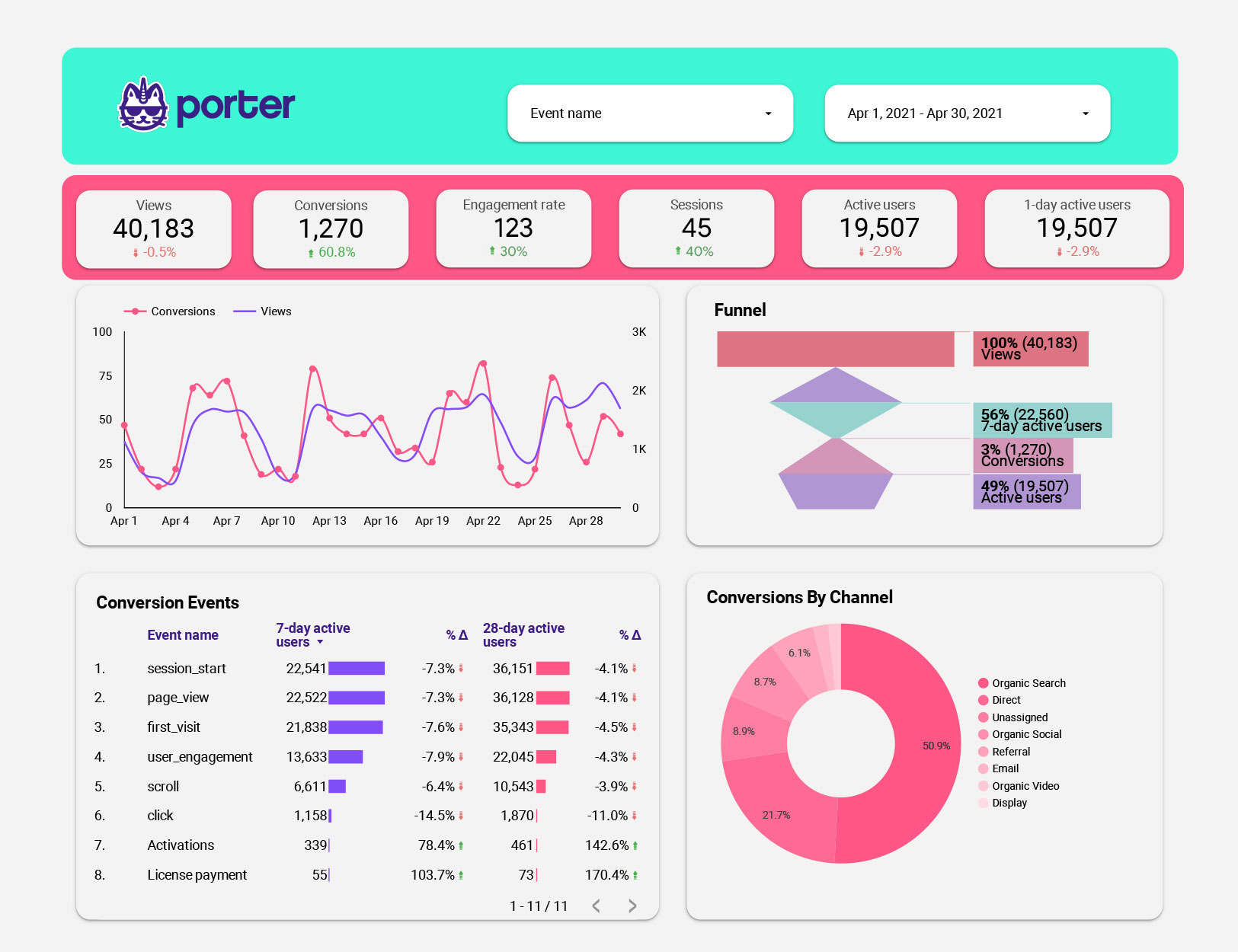
Unlock Your Sales Potential: A Simple Guide to Google Analytics
Hey there, marketing friends! Ever feel like you're throwing spaghetti at the wall, hoping something sticks when it comes to your online sales strategy? You're not alone. We've all been there, staring at endless spreadsheets and wondering where our precious marketing dollars are actually going. Imagine launching a fantastic new product, pouring resources into advertising, and... crickets. Or worse, a slow trickle of sales that barely covers the cost of your morning coffee, let alone the entire campaign! It’s frustrating, right? You're left scratching your head, wondering what went wrong. Was it the ad copy? The landing page? The phase of the moon? (Okay, maybe not the moon, but you get the idea.)
But what if I told you there's a powerful, and oftenfree, tool that can help you cut through the noise and understand exactly what's driving (or hindering) your sales? I'm talking about Google Analytics, of course! Now, I know what you might be thinking: "Google Analytics? That sounds complicated and technical." And yes, it can seem a bit intimidating at first glance. All those charts, graphs, and metrics...it's enough to make anyone's head spin. But trust me, once you understand the basics, Google Analytics can become your best friend in the world of online sales. Forget guessing and hoping – with Google Analytics, you can make data-driven decisions that actually move the needle.
Think of it like this: imagine you own a physical store. You'd naturally want to know which aisles people are browsing the most, which displays are catching their eye, and which products are flying off the shelves. Google Analytics does the same thing for your website! It tracks user behavior, providing valuable insights into how people are interacting with your content, which channels are driving the most traffic, and ultimately, what's leading to those sweet, sweet sales. And in today's competitive online landscape, understanding your customer’s journey is no longer a luxury – it's a necessity.
Without tracking sales, you are like a ship sailing in a dark ocean at night; you have no idea where you're going or what obstacles lie ahead. Are your social media ads actually leading to purchases? Is your blog content converting readers into customers? Which landing pages are performing the best? Google Analytics can answer all of these questions and more. It's like having a 24/7 sales analyst working for you, providing real-time data and insights to help you optimize your strategy and maximize your ROI. With access to this data, you're able to make informed decisions to increase sales.
So, ready to stop guessing and start growing your sales with the power of Google Analytics? Keep reading, because we're about to break down the process into simple, easy-to-follow steps. We will show you all you need to know so you can start using data to drive sales.
Harnessing Google Analytics for Sales Tracking: A Comprehensive Guide
Let's dive deep into how you can leverage Google Analytics to effectively track your sales and boost your business's bottom line. We're going to explore everything from setting up goals and e-commerce tracking to understanding key reports and optimizing your sales funnel.
Setting Up Google Analytics: The Foundation for Success
Before we can start tracking sales, we need to make sure Google Analytics is properly set up on your website. Here's how:
• Create a Google Analytics Account: If you don't already have one, head over to the Google Analytics website and create a new account. You'll need a Google account (like your Gmail account) to get started.
Follow the prompts to set up your account. This typically involves providing basic information about your website, such as the URL, industry category, and reporting time zone.
• Add the Google Analytics Tracking Code to Your Website: This is the crucial step that allows Google Analytics to track user behavior on your site.
After setting up your account, Google Analytics will provide you with a unique tracking code. This code is a small snippet of Java Script that needs to be added to every page of your website. The easiest way to do this is to paste the code into the <head> section of your website's HTML. If you're using a content management system (CMS) like Word Press, there are plugins available that can help you easily add the tracking code without having to manually edit the HTML.
• Verify Your Installation: Once you've added the tracking code, it's important to verify that it's working correctly.
Google Analytics provides a real-time report that shows the current number of active users on your site. Check this report to make sure it's tracking your own visits to the website. If you see your own activity being tracked, then you know the tracking code is working properly.
Enabling E-commerce Tracking: Unlocking Sales Data
To track sales effectively, you need to enable e-commerce tracking in Google Analytics. This tells Google Analytics to specifically track transactions and revenue generated on your website. Here's how to do it:
• Navigate to the E-commerce Settings: In your Google Analytics account, go to the "Admin" section, then select "E-commerce Settings" under the "View" column.
• Enable E-commerce Tracking: Turn the "Enable E-commerce" setting to On.• (Optional) Enable Enhanced E-commerce: Enhanced E-commerce provides more detailed information about the customer journey, such as product impressions, product clicks, add-to-carts, and checkout steps. While optional, enabling this feature can give you a much deeper understanding of how users interact with your products and shopping cart.
• Implement E-commerce Tracking Code: This is where things get a bit more technical. You'll need to add specific code snippets to your website that send transaction data to Google Analytics. This typically involves working with your website developer or e-commerce platform to ensure that the correct data is being captured and sent to Google Analytics. The code needs to track data like transaction ID, revenue, shipping costs, taxes, and the products purchased. Most e-commerce platforms have built-in integrations with Google Analytics that simplify this process. For example, if you're using Shopify, there's a simple setting to enable Google Analytics e-commerce tracking.
Setting Up Goals: Defining Conversions Beyond Sales
While tracking sales is crucial, it's also important to track other key conversions that lead to sales. This is where goals come in. Goals allow you to track specific actions that users take on your website, such as signing up for a newsletter, downloading a resource, or spending a certain amount of time on a page. Here's how to set up goals:
• Navigate to the Goals Section: In your Google Analytics account, go to the "Admin" section, then select "Goals" under the "View" column.
• Create a New Goal: Click the "+ New Goal" button to create a new goal.
• Choose a Goal Template or Create a Custom Goal: Google Analytics provides several goal templates, such as "Make a purchase," "Inquire," and "Create an account." You can also create a custom goal to track a specific action that's not covered by the templates.
• Define Goal Details: Depending on the type of goal you're creating, you'll need to define specific details, such as the destination page (e.g., the "Thank You" page after a newsletter signup), the event category and action (e.g., clicking a specific button), or the duration of a visit.
For example, if you want to track newsletter signups, you can create a destination goal that triggers when a user lands on the "Thank You" page after submitting the signup form. This will allow you to see how many people are signing up for your newsletter and which channels are driving the most signups.
Understanding Key Google Analytics Reports for Sales
Now that you've set up Google Analytics and enabled e-commerce tracking, it's time to start exploring the key reports that will provide valuable insights into your sales performance. Here are some of the most important reports to focus on:
• Overview Report: The E-commerce Overview report provides a high-level summary of your e-commerce performance, including revenue, transaction volume, conversion rate, and average order value. This report is a great starting point for understanding your overall sales trends.
• Product Performance Report: This report shows you which products are selling the best, as well as their revenue, quantity sold, and average price. Use this report to identify your top-selling products and optimize your product merchandising strategy.
• Sales Performance Report: The Sales Performance report provides a detailed breakdown of your sales revenue over time. You can use this report to track your sales growth, identify seasonal trends, and measure the impact of your marketing campaigns.
• Transactions Report: The Transactions report provides a list of all individual transactions that have occurred on your website. This report allows you to drill down into the details of each transaction, such as the products purchased, the customer's location, and the date and time of the purchase.
• Source/Medium Report: This report shows you where your website traffic is coming from, such as organic search, paid advertising, social media, and email marketing. This is essential for understanding which channels are driving the most sales. For example, you might find that organic search is driving a significant amount of revenue, which suggests that you should invest more in SEO.
• Landing Page Report: This report shows you which landing pages are performing the best in terms of conversions and revenue. Use this report to optimize your landing pages for higher conversions.
For example, you might find that a particular landing page has a high bounce rate, which suggests that it's not relevant to the traffic that's landing on it. You can then optimize the landing page by improving the content, design, or call to action.
Segmenting Your Data: Uncovering Hidden Insights
Segmentation allows you to slice and dice your data to uncover hidden insights that would otherwise be missed. By segmenting your data, you can identify specific groups of users who are behaving in different ways and tailor your marketing efforts accordingly. Here are some common ways to segment your data:
• By Traffic Source: Segment your data by traffic source (e.g., organic search, paid advertising, social media) to see which channels are driving the most valuable traffic.
• By Device: Segment your data by device (e.g., desktop, mobile, tablet) to see how users are behaving on different devices. This can help you optimize your website for mobile users, who may have different browsing habits than desktop users.
• By Demographics: If you have demographic data available, you can segment your data by age, gender, and location to see how different demographic groups are interacting with your website.
• By Behavior: Segment your data by user behavior, such as new vs. returning visitors, users who have added items to their cart, or users who have completed a purchase.
For example, you might segment your data to see how new visitors are behaving compared to returning visitors. This can help you identify areas where you can improve the onboarding experience for new users.
Using Google Analytics to Optimize Your Sales Funnel
The sales funnel is the process that customers go through from initial awareness to final purchase. By using Google Analytics, you can identify bottlenecks in your sales funnel and optimize each stage for higher conversions. Here's how:
• Identify Key Stages in Your Sales Funnel: Define the key stages in your sales funnel, such as awareness, consideration, and purchase.
• Track User Behavior at Each Stage: Use Google Analytics to track how users are behaving at each stage of the funnel. For example, you can track the number of users who are visiting your product pages (awareness), adding items to their cart (consideration), and completing a purchase (purchase).
• Identify Bottlenecks: Look for areas in the funnel where users are dropping off. For example, if you see a high drop-off rate between the "Add to Cart" page and the "Checkout" page, this suggests that there's a problem with your checkout process.
Is the checkout process too long or complicated? Are there hidden fees that are surprising customers? By identifying these bottlenecks, you can focus your optimization efforts on the areas that will have the biggest impact on your sales.
• Optimize Each Stage: Once you've identified the bottlenecks, you can start optimizing each stage of the funnel to improve conversions. For example, you can simplify your checkout process, offer free shipping, or provide more information about your products.
Real-World Examples: How Businesses Are Using Google Analytics to Boost Sales
Let’s explore real-world examples of businesses using Google Analytics to drive their sales efforts:
• E-commerce Retailer: An online clothing retailer noticed a high bounce rate on their product pages. By analyzing the data in Google Analytics, they discovered that many users were landing on product pages from mobile devices but were having trouble viewing the product images. The retailer optimized their website for mobile devices and improved the product images, which resulted in a significant increase in mobile conversions.
• Subscription Service: A subscription service company was struggling to convert free trial users into paying customers. By tracking user behavior in Google Analytics, they discovered that many free trial users were not fully exploring the features of the service. The company created a series of onboarding emails and tutorials to help free trial users get the most out of the service, which resulted in a significant increase in paid subscriptions.
• B2B Software Company: A B2B software company was looking to improve the lead generation efforts. By analyzing the data in Google Analytics, they discovered that their blog was driving a significant amount of traffic but not generating many leads. The company added calls to action to their blog posts and created lead magnets (e.g., ebooks, webinars) to capture the attention of readers. As a result, lead generation increased dramatically.
Frequently Asked Questions About Google Analytics and Sales Tracking
• Q: Is Google Analytics free?
A: Yes, the basic version of Google Analytics is free to use. However, there's also a paid version called Google Analytics 360, which offers more advanced features and higher data limits. But for most small to medium-sized businesses, the free version is more than sufficient.
• Q: How accurate is Google Analytics?
A: Google Analytics is generally considered to be highly accurate, but it's not perfect. There are several factors that can affect the accuracy of the data, such as ad blockers, privacy settings, and sampling. However, for most purposes, the data is accurate enough to provide valuable insights.
• Q: How long does it take to see results from Google Analytics?
A: You can start seeing data in Google Analytics almost immediately after installing the tracking code. However, it takes time to collect enough data to draw meaningful conclusions. In general, it's recommended to wait at least a few weeks or months before making any major changes to your website or marketing strategy based on the data in Google Analytics.
• Q: Can I use Google Analytics to track offline sales?
A: While Google Analytics is primarily designed to track online sales, you can also use it to track offline sales by using a feature called Measurement Protocol. Measurement Protocol allows you to send data from any source to Google Analytics, including offline sales, phone calls, and even in-store visits.
Congrats, friends! You've made it to the end of this guide, and hopefully, you're now equipped with the knowledge and tools to start using Google Analytics to track your sales and boost your business. We’ve covered everything from setting up your account and enabling e-commerce tracking to understanding key reports and optimizing your sales funnel. Now, it's time to put these strategies into action! Don't be afraid to dive in, experiment with different settings, and explore the wealth of data that Google Analytics has to offer.
Remember, data is your friend, not your foe. The more you understand your customers' behavior, the better equipped you'll be to create a winning sales strategy. Analyze your data, identify your strengths and weaknesses, and make data-driven decisions. The key is to start small, learn as you go, and continuously refine your approach based on the insights you gain from Google Analytics.
So, what are you waiting for? Go ahead and start exploring the world of Google Analytics, and watch your sales soar! Let me challenge you to set up at least one goal or enable e-commerce tracking this week. You've got this!

Post a Comment for "How to Use Google Analytics to Track Sales"
Post a Comment