How to Use Twitter Analytics to Grow Your Account
Unlock Your Twitter Growth: Mastering Twitter Analytics
Hey there, Twitter aficionados! Ever feel like you're shouting into the void on Twitter? You're crafting witty tweets, sharing insightful articles, and engaging with your followers, but the numbers just aren't budging. It's like throwing a party and only your grandma shows up – bless her heart, but you were hoping for a bigger crowd, right? We've all been there. You pour your heart and soul into crafting the perfect tweet, only to see it disappear into the endless scroll of the Twitterverse. Or maybe you're seeing some action, but you're not quite surewhy. What's working? What's flopping harder than a pancake on a hot griddle? It's frustrating, to say the least. It's like trying to bake a cake without a recipe – you might get something edible, but chances are it'll be a sugary mess. In today's world, understanding data is like having a superpower, and Twitter analytics is your cheat code to social media success.
Imagine if you had a crystal ball that showed you exactly what your audience wanted, when they wanted it, and how they wanted it delivered. That's essentially what Twitter Analytics offers. It's not just about vanity metrics like follower count and likes; it's about understanding thewhybehind the numbers. It's about digging deep into the data to uncover hidden insights that can transform your Twitter strategy from a shot in the dark to a laser-focused campaign.
Think of it like this: you're a detective, and Twitter Analytics is your magnifying glass. You're sifting through the clues – impressions, engagements, profile visits – to crack the case of how to grow your account. And trust me, the answers are there, waiting to be discovered. So, ready to ditch the guesswork and start making data-driven decisions? Want to turn your Twitter account into a thriving hub of engagement and growth? Stick around, because we're about to dive deep into the wonderful world of Twitter Analytics. Get ready to learn how to unlock its power and transform your Twitter game forever!
How to Use Twitter Analytics to Grow Your Account
Understanding Twitter Analytics: Your Twitter Command Center
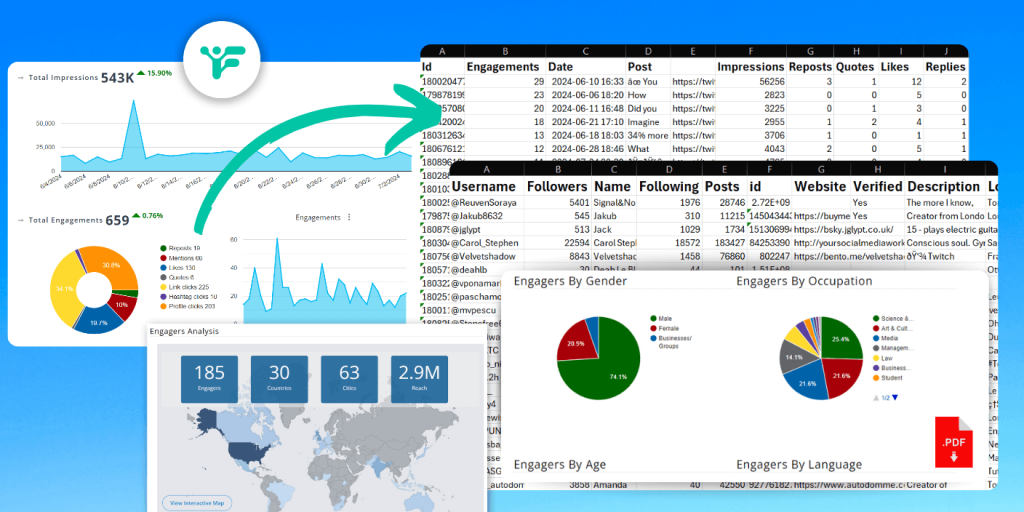
Let's get real. Twitter Analytics isn't just some fancy tool for social media gurus. It’s your personal command center for understanding your Twitter performance. Think of it as the dashboard of a high-performance sports car. You need to know what each gauge means to drive effectively. So, let’s break down the basics and learn how to navigate this powerful feature.
• Accessing Your Analytics Dashboard
First things first, you need to know how to get to your Twitter Analytics dashboard. It's easier than you think. Simply log in to your Twitter account on a desktop computer. From there, click on "More" in the left-hand navigation menu. You'll see "Analytics" in the dropdown. Click that, and bam! You're in. Alternatively, you can directly visit analytics.twitter.com.
• Key Metrics: Impressions, Engagement, and More
Once you're in the dashboard, you'll be greeted with a wealth of data. Don't get overwhelmed! Let's focus on the key metrics that matter most.
Impressions: This is the number of times your tweets were seen by users. Think of it as your potential reach. The higher the number, the more eyeballs on your content.
Engagement: This refers to how people interact with your tweets. This includes likes, retweets, replies, and link clicks. Engagement is a crucial indicator of how well your content resonates with your audience.
Engagement Rate: This is the percentage of impressions that resulted in engagement. It's a key indicator of the quality and relevance of your tweets. A higher engagement rate means your content is hitting the mark.
Profile Visits: This is the number of times people visited your profile page. It's a good indicator of how compelling your content is at driving people to learn more about you.
Followers: This is the total number of people following you, obviously. While not the be-all and end-all, it's still a good indicator of your overall influence and reach.
• Customizing Your Dashboard
Twitter Analytics allows you to customize your dashboard to focus on the metrics that are most important to you. You can adjust the date range to analyze performance over specific periods, and you can even export your data for further analysis in spreadsheets. Play around with the settings to get a view that works best for you.
Decoding Your Audience: Understanding Who You're Talking To
Knowing your audience is like having a secret weapon. The more you understand their demographics, interests, and behaviors, the better you can tailor your content to resonate with them. Twitter Analytics provides valuable insights into your audience, helping you create content that hits the mark.
• Demographics: Age, Gender, Location
Twitter Analytics gives you a breakdown of your audience's demographics, including age, gender, and location. This information can be incredibly useful for understanding who you're reaching and whether you're attracting the right audience. For example, if you're targeting a younger audience but your analytics show that most of your followers are older, you might need to adjust your content strategy to appeal to a younger demographic.
• Interests: What Your Audience Cares About
Twitter Analytics also provides insights into the interests of your audience. This information is based on the topics they follow, the accounts they interact with, and the keywords they use in their tweets. Understanding your audience's interests allows you to create content that is relevant and engaging to them. For example, if you know that your audience is interested in technology, you can share articles, news, and insights related to the tech industry.
• Behaviors: When and How Your Audience Engages
Knowing when your audience is most active and how they engage with your content is crucial for maximizing your reach and engagement. Twitter Analytics provides data on the times of day when your audience is most active, as well as the types of content they engage with most. Use this information to schedule your tweets for optimal visibility and to create content that resonates with your audience's preferences.
• Using Audience Insights to Refine Your Content Strategy
Armed with demographic, interest, and behavioral data, you can now refine your content strategy to better appeal to your audience. This might involve creating different types of content, adjusting your posting schedule, or targeting specific topics. The key is to experiment and track your results to see what works best.
Optimizing Your Tweets: Crafting Content That Converts
Creating great content is only half the battle. You also need to optimize your tweets to maximize their reach and engagement. Twitter Analytics can help you identify what works and what doesn't, allowing you to fine-tune your tweeting strategy.
• Analyzing Tweet Performance: What's Working, What's Not
Twitter Analytics provides detailed data on the performance of each of your tweets. This includes impressions, engagement, and engagement rate. By analyzing this data, you can identify which tweets are resonating with your audience and which ones are falling flat. Look for patterns in the tweets that perform well, such as the topics they cover, the format they use, and the time they were posted. Use these insights to inform your future tweeting strategy.
• Experimenting with Different Content Formats: Text, Images, Videos
Not all content formats are created equal. Some audiences prefer text-based tweets, while others are more engaged by images or videos. Experiment with different content formats to see what resonates best with your audience. Twitter Analytics can help you track the performance of each format, allowing you to determine which ones are most effective at driving engagement.
• Mastering Hashtags: Reaching a Wider Audience
Hashtags are a powerful tool for expanding the reach of your tweets. By using relevant hashtags, you can expose your content to a wider audience who are interested in the topics you're tweeting about. Twitter Analytics can help you identify which hashtags are most effective for your tweets. Look for hashtags that are trending or that are commonly used by your target audience. Be careful not to overdo it with hashtags, though. A few well-chosen hashtags are more effective than a barrage of irrelevant ones.
• Timing is Everything: When to Tweet for Maximum Impact
The timing of your tweets can have a significant impact on their visibility and engagement. Twitter Analytics can help you determine when your audience is most active, allowing you to schedule your tweets for optimal impact. Experiment with different posting times and track your results to see what works best. Keep in mind that the best time to tweet may vary depending on your audience and your location.
Tracking Your Competitors: Learning from the Best
Keeping an eye on your competitors is a smart way to stay ahead of the curve. By analyzing their Twitter performance, you can identify what's working for them and learn from their successes (and failures). While Twitter Analytics doesn't directly provide competitive analysis tools, you can use it to monitor your competitors' activity and track their key metrics.
• Identifying Key Competitors
Start by identifying your key competitors on Twitter. These are the accounts that are targeting the same audience as you and that are offering similar products or services. Make a list of these accounts and start monitoring their activity.
• Monitoring Their Activity: Tweets, Engagement, Hashtags
Pay attention to the types of tweets your competitors are posting, the engagement they're receiving, and the hashtags they're using. Look for patterns in their most successful tweets and try to identify what's resonating with their audience. This can give you valuable insights into what's working in your industry and what you can do to improve your own Twitter strategy.
• Benchmarking Your Performance: How Do You Stack Up?
Compare your own Twitter performance to that of your competitors. Are you getting as many impressions, engagements, and followers as they are? If not, what can you do to improve? Look for areas where your competitors are outperforming you and try to identify the reasons why. This can help you identify areas where you can improve your own Twitter strategy.
• Learning from Their Successes (and Failures)
Don't be afraid to learn from your competitors' successes (and failures). If they're doing something that's working well, try to adapt it to your own Twitter strategy. And if they're making mistakes, learn from them so you can avoid making the same mistakes yourself. The key is to stay informed and to continuously refine your Twitter strategy based on what you're learning from your competitors.
Measuring Your ROI: Proving the Value of Your Twitter Efforts
In the end, it all comes down to ROI (Return on Investment). Is your Twitter activity actually contributing to your business goals? Twitter Analytics can help you measure your ROI and prove the value of your Twitter efforts.
• Defining Your Goals: What Are You Trying to Achieve?
Start by defining your goals for Twitter. What are you trying to achieve with your Twitter activity? Are you trying to increase brand awareness, generate leads, drive traffic to your website, or something else? Once you know your goals, you can start tracking the metrics that are most relevant to measuring your progress.
• Tracking Key Metrics: Website Traffic, Leads, Sales
Track the key metrics that are relevant to your goals. If you're trying to drive traffic to your website, track the number of clicks you're getting from Twitter. If you're trying to generate leads, track the number of leads you're getting from Twitter. And if you're trying to drive sales, track the number of sales you're getting from Twitter. Use Google Analytics or other tracking tools to accurately measure the impact of your Twitter activity on your business goals.
• Calculating Your ROI: Is Twitter Worth the Investment?
Once you've tracked your key metrics, you can calculate your ROI. How much revenue are you generating from your Twitter activity compared to the cost of your time and resources? If your ROI is positive, then Twitter is worth the investment. If not, you may need to rethink your Twitter strategy.
• Adjusting Your Strategy Based on ROI
Use your ROI data to adjust your Twitter strategy. If certain tactics are generating a high ROI, invest more in those tactics. If other tactics are generating a low ROI, consider abandoning them. The key is to continuously optimize your Twitter strategy based on what's working and what's not.
Advanced Analytics Techniques
• Using Twitter Analytics API
For developers and data scientists, the Twitter Analytics API offers a more programmatic way to access and analyze Twitter data. This API allows you to build custom dashboards, automate reporting, and integrate Twitter data with other data sources. This is very helpful for organizations that require advance use of data.
• Integrating with Third-Party Tools
Many third-party tools integrate with Twitter Analytics to provide more advanced analysis and reporting capabilities. These tools can help you track your brand mentions, analyze your sentiment, and identify influencers in your industry. Tools like Hootsuite, Buffer, and Sprout Social offer robust analytics features that can supplement Twitter's built-in analytics.
• Sentiment Analysis
Sentiment analysis involves using natural language processing (NLP) to determine the emotional tone of tweets. This can help you understand how people are feeling about your brand, products, or services. Sentiment analysis tools can automatically analyze tweets and classify them as positive, negative, or neutral. This information can be valuable for identifying and addressing customer concerns.
• Social Listening
Social listening involves monitoring social media channels for mentions of your brand, products, or services. This can help you identify opportunities to engage with your audience, respond to customer inquiries, and address negative feedback. Social listening tools can also help you track industry trends and identify potential threats or opportunities.
Common Mistakes to Avoid
• Ignoring the Data
One of the biggest mistakes you can make is ignoring the data altogether. Twitter Analytics provides valuable insights into your audience, your content, and your overall performance. If you're not paying attention to the data, you're flying blind.
• Focusing Only on Vanity Metrics
Vanity metrics like follower count and likes are nice to look at, but they don't necessarily tell you anything about the real impact of your Twitter activity. Focus on the metrics that are most relevant to your goals, such as website traffic, leads, and sales.
• Making Assumptions
Don't make assumptions about what your audience wants or what's working. Let the data guide your decisions. Test different tactics and track your results to see what works best.
• Being Inconsistent
Consistency is key to success on Twitter. Post regularly and engage with your audience consistently. Don't let your Twitter activity fall by the wayside.
Twitter Analytics: Frequently Asked Questions
Let's tackle some common questions about using Twitter Analytics to grow your account:
• Question: How often should I check my Twitter Analytics?
Answer: It depends on your goals and how actively you're Tweeting. I recommend checking it at least once a week to monitor trends and make adjustments to your strategy.
• Question: What if my engagement rate is low?
Answer: Don't panic! Analyze your content. Is it relevant to your audience? Are you using compelling visuals? Experiment with different formats and topics to see what resonates better.
• Question: Is it worth paying for third-party analytics tools?
Answer: It depends on your needs and budget. If you're a serious marketer or run a business, the advanced features of paid tools can be worth the investment. But for casual users, Twitter's built-in analytics might be sufficient.
• Question: How can I use Twitter Analytics to improve my ad campaigns?
Answer: Use the demographic and interest data to target your ads more effectively. Analyze the performance of your organic tweets to identify what resonates with your audience, and then use those insights to create more compelling ad copy and visuals.
Alright, friends, we've journeyed deep into the world of Twitter Analytics, uncovering its secrets and learning how to wield its power. From understanding the basics of the dashboard to diving into audience demographics and optimizing your tweets for maximum impact, we've covered a lot of ground. But remember, knowledge is only power when it's put into action. So, it's time to take everything you've learned and start applying it to your own Twitter strategy.
Now, here's your call to action: Log in to your Twitter Analytics dashboardright now. Spend some time exploring the data, identifying key trends, and brainstorming ideas for how you can improve your performance. Don't just passively read this article; actively engage with it and start experimenting with the strategies we've discussed. The world of Twitter is constantly evolving, so always keep exploring and practicing to improve your engagement and growth.

Post a Comment for "How to Use Twitter Analytics to Grow Your Account"
Post a Comment