How to Use Google Analytics to Track User Behavior
Unlock Your Website's Potential: A Beginner's Guide to Google Analytics
Hey there, fellow website wanderers! Ever feel like your website is a ship sailing in the dark, and you're not quite sure where it's going or who's on board? You pour your heart and soul into creating content, crafting the perfect user experience, and spreading the word, but are youreallyreaching the right people? Are they doing what youwantthem to do when they land on your site? Are you just throwing spaghetti at the wall and hoping something sticks? I feel you, because that's how I felt before understanding Google Analytics.
Imagine you're running a lemonade stand. You see kids stopping by, some buying, some just looking. Wouldn't it be awesome to knowwhysome buy and others don't? Maybe you need more sugar, or perhaps a brighter sign! That’s essentially what Google Analytics does for your website. It gives you the data to understand your "customers" (website visitors) and optimize your "lemonade stand" (website) for maximum "sales" (conversions, engagement, or whatever your goals are).
Think of it like this: you've got this amazing blog post about the best way to train your pet hamster to do tricks. You share it everywhere! But... crickets. Google Analytics can tell youwhy. Are people even finding the page? Are they leaving after five seconds because your hamster looks terrifying? (No offense to your hamster.) It gives you the power to pinpoint problems and actuallyfixthem.
Now, I know what you might be thinking: "Analytics? Ugh, sounds complicated and boring!" And trust me, the interface can be a little intimidating at first. All those charts, graphs, and metrics... it's easy to get lost in the data jungle. But fear not, my friends! This guide is designed to cut through the jargon and show you how to use Google Analytics to track user behavior in a way that’s both effective and (dare I say?) enjoyable. We'll break it down into simple, actionable steps, so you can start making data-driven decisions and unlock the true potential of your website.
Ready to ditch the guesswork and start understanding your website visitors like never before? Let's dive in and transform your website from a ship in the dark into a well-charted course! Keep reading to find out how you can turn raw data into actionable insights, and start making your website work smarter, not harder.
Getting Started with Google Analytics: Your Website's New Best Friend
Alright, let's get down to brass tacks. The first step to understanding your website visitors is, well, getting Google Analytics set up! Don't worry, it's easier than teaching a hamster to skateboard (probably).
• Creating a Google Analytics Account:
If you already have a Google account (Gmail, You Tube, etc.), you're halfway there! Just head over to the Google Analytics website and sign in. If not, you'll need to create one. It's free and takes about two minutes, tops. Once you're logged in, follow the prompts to set up a new account for your website. This involves providing some basic information about your business and website, like your website's name and URL. Think of it as introducing Google Analytics to your digital baby.
• Adding the Tracking Code to Your Website:
This is where things get slightly more technical, but don't panic! Google Analytics will provide you with a unique tracking code – a small snippet of Java Script – that needs to be added to every page of your website. This code is like a tiny spy that anonymously collects data about your visitors and sends it back to Google Analytics. There are a few ways to do this:
- Directly into your website's HTML: If you're comfortable editing your website's code, you can paste the tracking code right before the closing `` tag on each page.
- Using a plugin or module: If you're using a content management system (CMS) like Word Press, Drupal, or Joomla, there are likely plugins or modules that make it super easy to add the tracking code without touching any code. Just search for "Google Analytics" in your CMS's plugin directory, install the plugin, and follow the instructions to connect it to your Google Analytics account.
- Google Tag Manager: For more advanced users, Google Tag Manager is a powerful tool that allows you to manage all your website's tracking codes (including Google Analytics) in one place. It requires a bit of setup, but it can save you a lot of time and hassle in the long run.
Whichever method you choose, make sure the tracking code is installed correctly oneverypage of your website. Otherwise, you'll only be getting partial data, which is like trying to bake a cake with only half the ingredients.
• Verifying Your Installation:
Once you've installed the tracking code, it's important to verify that it's working correctly. The easiest way to do this is to visit your website and then check the "Real-Time" reports in Google Analytics. If you see yourself (or anyone else who's currently on your site) listed as an active user, you're good to go! If not, double-check your installation and make sure the tracking code is in the right place.
Understanding the Google Analytics Interface: A Quick Tour
Okay, you've got Google Analytics set up and running. Now it's time to explore the interface and get familiar with the key reports and features. Think of this as learning the layout of your lemonade stand so you can quickly find the sugar and lemons when the customers start lining up.
• The Home Dashboard:
This is the first thing you'll see when you log into Google Analytics. It provides a high-level overview of your website's performance, including key metrics like users, sessions, bounce rate, and session duration. It's a great place to get a quick snapshot of how your website is doing overall. You can customize the dashboard to show the metrics that are most important to you.
• Real-Time Reports:
As the name suggests, these reports show you what's happening on your websiteright now. You can see how many people are currently on your site, what pages they're viewing, and where they're coming from. This is useful for monitoring the impact of a new blog post, a social media campaign, or any other event that might drive traffic to your website. It’s like having a live camera feed into your website activity.
• Audience Reports:
These reports provide detailed information about your website visitors, including their demographics (age, gender, location), interests, behavior (new vs. returning users, frequency of visits), and technology (browser, operating system, mobile device). Understanding your audience is crucial for tailoring your content and marketing efforts to their needs and preferences. For example, if you see that a large percentage of your visitors are using mobile devices, you'll want to make sure your website is mobile-friendly.
• Acquisition Reports:
These reports show you where your website traffic is coming from. You can see how many visitors are coming from organic search (Google, Bing, etc.), paid search (Google Ads), social media, referral links, and direct traffic. This information is essential for evaluating the effectiveness of your marketing campaigns and identifying which channels are driving the most valuable traffic to your website. If you're spending a lot of money on Facebook ads but not seeing a good return on investment, the Acquisition reports will help you identify that problem.
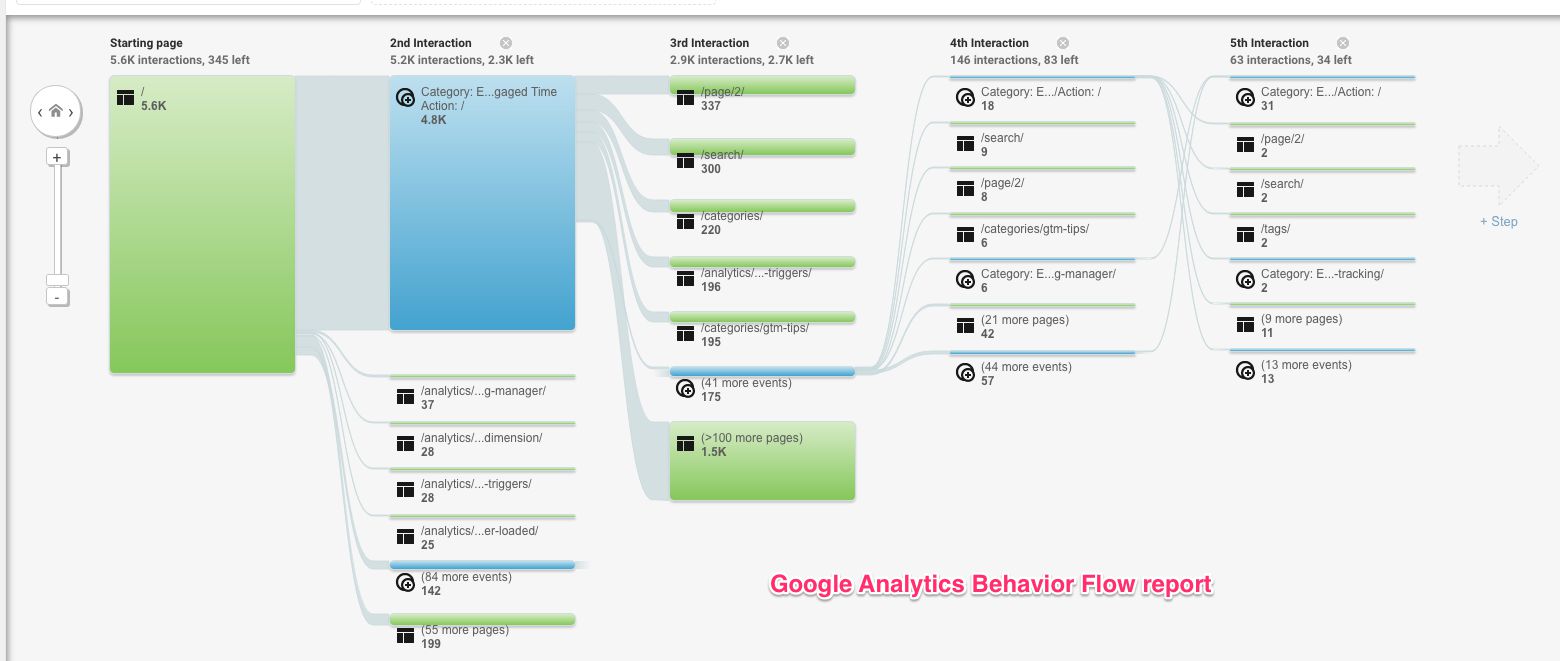
• Behavior Reports:
These reports show you how visitors are interacting with your website. You can see which pages are the most popular, how long people are spending on each page, and where they're clicking. This information is invaluable for optimizing your website's content and user experience. For example, if you see that a lot of people are leaving your website after viewing a particular page, you might want to improve the content or design of that page.
• Conversions Reports:
These reports track the completion of specific goals on your website, such as filling out a form, making a purchase, or subscribing to a newsletter. Setting up goals in Google Analytics is essential for measuring the success of your website and identifying areas for improvement. For example, if you want to track how many people are signing up for your email list, you can set up a goal that triggers when someone reaches the "thank you" page after submitting the signup form.
Tracking Key User Behaviors: What to Watch and Why
Now that you're familiar with the Google Analytics interface, let's talk about the specific user behaviors you should be tracking and why they matter. These are the key ingredients for your lemonade recipe that will make customers come back for more!
• Page Views and Unique Page Views:
Page views are the total number of times a page on your website has been viewed. Unique page views count the number of sessions during which a page was viewed one or more times. Tracking these metrics can help you identify your most popular content and understand which pages are attracting the most attention. A high number of page views on a particular blog post suggests that it's resonating with your audience.
• Bounce Rate:
Bounce rate is the percentage of visitors who leave your website after viewing only one page. A high bounce rate can indicate that your website is not engaging or relevant to your visitors. It could also mean that your website is slow to load or that the design is confusing. Aim for a low bounce rate, as it suggests that visitors are finding what they're looking for and exploring other pages on your site. For example, imagine someone searching for "best chocolate chip cookie recipe" and landing on your site, only to find a page about car repair. They’re going to bounce right off!
• Session Duration:
Session duration is the average amount of time visitors spend on your website during a single session. A longer session duration generally indicates that visitors are engaged with your content and finding it valuable. Track session duration to identify which pages or content formats are most effective at keeping visitors on your site. If people are spending a lot of time on a particular page, it's a good sign that they're finding it useful and interesting.
• Exit Pages:
Exit pages are the last pages visitors view before leaving your website. Identifying your top exit pages can help you understand where visitors are dropping off and why. If a particular page has a high exit rate, it might indicate a problem with the content, design, or call to action on that page. Perhaps the information is outdated, the navigation is confusing, or the page simply doesn't provide what the visitor is looking for.
• Event Tracking:
Event tracking allows you to track specific actions that visitors take on your website, such as clicking a button, downloading a file, or watching a video. Setting up event tracking requires a bit of technical knowledge, but it can provide valuable insights into how visitors are interacting with your content. For example, you can track how many people are clicking on a call-to-action button on your homepage or how many people are watching a promotional video on your landing page.
• Goal Conversions:
As mentioned earlier, goal conversions track the completion of specific objectives on your website. Whether it's filling out a form, making a purchase, or subscribing to a newsletter, tracking goal conversions is essential for measuring the success of your website and identifying areas for improvement. Make sure you define clear goals for your website and set them up in Google Analytics to track your progress.
Putting It All Together: Using Data to Improve Your Website
Okay, you've got the data. Now what? The real magic of Google Analytics lies in your ability to analyze the data and use it to make informed decisions about your website. Think of this as taste-testing your lemonade and adjusting the recipe based on customer feedback.
• Identifying Areas for Improvement:
Start by looking for patterns and trends in your data. Are there any pages with high bounce rates? Are there any areas where visitors are dropping off? Are there any marketing channels that are underperforming? By identifying these areas for improvement, you can focus your efforts on making changes that will have the biggest impact on your website's performance. If your blog post on hamster tricks has a high bounce rate, maybe the tricks are too complicated or the photos aren't inspiring enough!
• A/B Testing:
A/B testing, also known as split testing, is a method of comparing two versions of a webpage or element to see which one performs better. For example, you could test two different headlines for a blog post or two different button colors on a landing page. Google Analytics can be integrated with A/B testing tools to track the performance of each variation and determine which one is more effective. This is like having two lemonade stands side-by-side, one with a red sign and one with a blue sign, to see which one attracts more customers.
• Personalization:
Based on the data you collect in Google Analytics, you can personalize the user experience on your website to better meet the needs and preferences of your visitors. For example, you could show different content to visitors based on their location, interests, or browsing history. Personalization can lead to increased engagement, higher conversion rates, and a more satisfying user experience. Imagine greeting customers by name and offering them their favorite flavor of lemonade – that’s the power of personalization!
• Setting Benchmarks and Tracking Progress:
Finally, it's important to set benchmarks for your website's performance and track your progress over time. This will help you see whether your changes are having the desired effect and whether you're moving closer to your goals. Use Google Analytics to monitor your key metrics on a regular basis and make adjustments as needed. Think of it as measuring the sweetness of your lemonade each day and adjusting the sugar level to maintain the perfect taste.
Google Analytics FAQs
You've got questions, we've (probably) got answers! Here are some common questions about using Google Analytics:
• Q: How often should I check my Google Analytics reports?
A: It depends on your goals and the volume of traffic to your website. If you're running a major marketing campaign, you might want to check your reports daily. Otherwise, a weekly or monthly review is usually sufficient. The key is to be consistent and to look for trends over time.
• Q: Is Google Analytics GDPR compliant?
A: Yes, Google Analytics is GDPR compliant, but you need to make sure you're using it in a way that respects the privacy of your users. This includes obtaining consent for the use of cookies and providing users with the ability to opt out of tracking. Consult with a legal professional to ensure you're fully compliant with GDPR regulations.
• Q: Can I use Google Analytics to track offline conversions?
A: Yes, you can use Google Analytics to track offline conversions by importing data from your CRM or other systems. This requires some technical setup, but it can provide a more complete picture of your marketing efforts and their impact on your business.
• Q: Is Google Analytics the only analytics tool I should use?
A: Google Analytics is a powerful and versatile tool, but it's not the only option. Depending on your needs, you might also consider using other analytics tools, such as heatmaps, session recordings, or customer surveys. Combining different tools can provide a more comprehensive understanding of your users and their behavior.
Congratulations, friend! You've now taken the first steps towards mastering Google Analytics and understanding your website visitors like never before. We've covered everything from setting up your account to tracking key user behaviors and using data to improve your website. Remember, the key is to be curious, experiment, and never stop learning.
Now, here's your call to action: go log in to Google Analytics right now and start exploring your data! Set up a goal, track an event, or simply browse the reports and see what you can discover. The more you use Google Analytics, the more comfortable you'll become with the interface and the more valuable insights you'll uncover.
Data is the new lemonade (wait, that doesn't sound right...). Data empowers you to make smarter decisions, optimize your website, and ultimately achieve your goals. So embrace the power of analytics and start turning your website into a lean, mean, conversion-generating machine! What are you waiting for? Go forth and analyze!

Post a Comment for "How to Use Google Analytics to Track User Behavior"
Post a Comment