How to Use Facebook Insights to Improve Your Page
Unlock Your Facebook Page's Potential: A Guide to Mastering Insights
Hey there, fellow Facebook aficionado! Ever feel like you're shouting into the void with your Facebook page? Posting content, hoping it resonates, but seeing crickets? Or maybe you're getting some traction, but you're not quite sure why? We've all been there. Think of it like trying to bake a cake without a recipe – you might get lucky, but chances are, it'll be a bit of a disaster. You throw in some flour, some sugar, maybe some love, and hope for the best. Sometimes it works, sometimes it doesn't, and you're left wondering what went wrong. That's where Facebook Insights comes in – it's your recipe for success!
Facebook Insights is like having a secret decoder ring that unlocks all the mysteries behind your page's performance. It's a treasure trove of data, just waiting to be explored. I mean, we're talking about the kind of data that can tell you everything from when your audience is most active to what kind of content they're absolutely drooling over. It's like having a crystal ball, only instead of seeing your future, you're seeing the past and present behavior of your audience, which, let's be honest, is almost as good. Think about that time you posted that hilarious meme, and it went completely viral. Wouldn't it be awesome to know exactly why it resonated so well? Or maybe you poured your heart and soul into a thoughtful post, only to see it flop. Insights can help you understand why – maybe the timing was off, or the topic just wasn't what your audience was looking for.
But let's be real, diving into data can feel a little daunting. It's easy to get overwhelmed by all the numbers and charts. It can feel like you're back in math class, trying to decipher complex equations. You see all those graphs and numbers and your eyes start to glaze over, and you think, "I just wanted to share cat videos!" But trust me, it's not as scary as it looks. Think of it like learning a new language – at first, it seems impossible, but with a little practice, you'll be fluent in "Insights" in no time. And once you are, you'll be able to craft content that your audience loves, boost your engagement, and ultimately, grow your page like never before.
So, are you ready to unlock the secrets of Facebook Insights and transform your page from a tumbleweed drifting across the digital desert into a vibrant oasis of engagement? This guide is your compass, your map, and your trusty sidekick on this exciting journey. Buckle up, because we're about to dive deep into the world of Facebook Insights and discover how you can use its power to elevate your page to the next level.
Navigating the Facebook Insights Dashboard
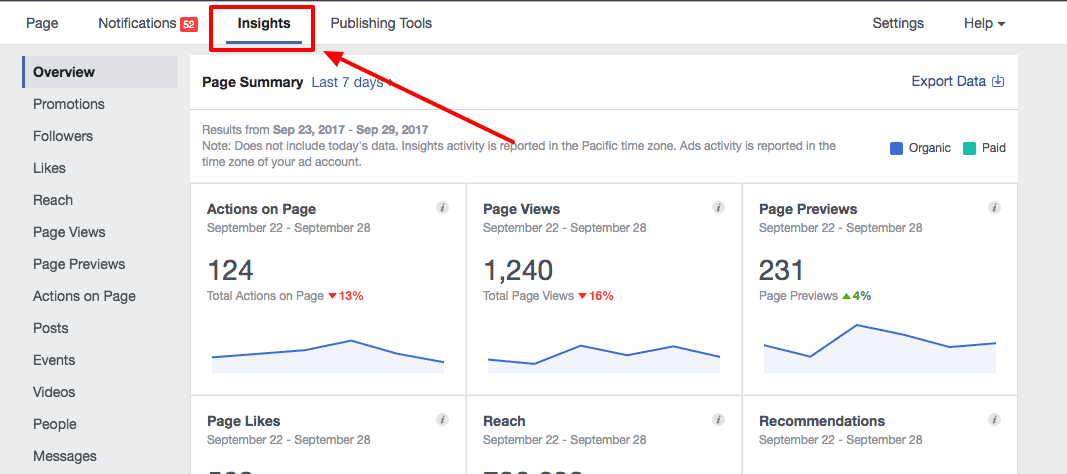
The Facebook Insights dashboard is where the magic happens. It's your central command center for all things data-related to your page. But with so much information at your fingertips, it's easy to feel lost in the digital wilderness. Let's break down the key areas and what they mean for you.
-
Overview: Your Quick Snapshot
Think of the overview as your "homepage" for Insights. It gives you a high-level summary of your page's performance over the last 7 days. It's the place you should check first, giving you a fast, reliable overview of the current performance. You'll see key metrics like page views, post reach, engagement, and video views. Keep an eye on these trends to quickly identify any spikes or dips in performance. A spike could indicate a particularly successful post or campaign, while a dip might signal a need to adjust your strategy. For example, a sudden drop in reach could mean that Facebook's algorithm has changed, or that your audience is losing interest in your content. Understanding these changes is crucial for staying ahead of the curve.
-
Followers: Who's Following You?
The Followers section shows you how your follower count is changing over time. You can see how many people have followed or unfollowed your page, and identify trends in follower growth. This data can be particularly valuable for understanding the impact of your marketing efforts. For example, if you've just run a successful ad campaign, you should see a corresponding increase in followers. Conversely, if you've recently posted controversial content, you might see a spike in unfollows. Analyzing these trends can help you refine your content strategy and avoid alienating your audience. Keep an eye on the "Net Followers" metric, which shows the overall change in your follower count. A positive number indicates growth, while a negative number indicates a decline.
-
Likes: Showing the Love
This section is all about page likes. It shows you how many people have liked your page, and where those likes are coming from. You can see how many likes were organic (from people finding your page on their own) versus paid (from people who saw your ads). This information can help you evaluate the effectiveness of your advertising campaigns. For example, if you're spending a lot of money on ads but not seeing a corresponding increase in organic likes, it might be time to rethink your targeting or ad creative. Also, pay attention to the "Unlike" trend. Monitoring this can give you early insights into possible content that is not aligned with your audience's expectations.
-
Reach: How Far Does Your Content Go?
Reach is a critical metric that tells you how many unique people have seen your content. It's important to understand that reach is not the same as impressions. Reach refers to the number of unique individuals who have viewed your post, while impressions refer to the total number of times your post has been displayed. One person can generate multiple impressions if they see your post more than once. In the Reach section, you can see the organic reach (the number of people who saw your content without you paying for it) and the paid reach (the number of people who saw your content because you paid for it). You can also see the viral reach, which is the number of people who saw your content because their friends interacted with it. Viral reach is the holy grail of Facebook marketing, as it represents free exposure to a wider audience.
-
Page Views: Who's Checking You Out?
The Page Views section shows you how many people have visited your Facebook page. You can see the total number of views, as well as a breakdown of views by section (e.g., Timeline, About, Photos). This data can help you understand what aspects of your page are most appealing to visitors. For example, if you see a lot of views on your "About" section, it might be a sign that people are interested in learning more about your business or organization. If you see a lot of views on your "Photos" section, it might be a sign that your visuals are particularly engaging. Also, pay close attention to the "Unique Page Views" metric, which tells you the number of distinct individuals who have visited your page. This is a more accurate measure of your page's popularity than the total number of views.
-
Post Engagement: Measuring the Buzz
Engagement is a key indicator of how well your content is resonating with your audience. It includes things like likes, comments, shares, and clicks. The Post Engagement section breaks down these metrics for each of your posts, allowing you to see which content is generating the most buzz. Pay attention to the "Engagement Rate," which is the percentage of people who saw your post and interacted with it. A high engagement rate indicates that your content is highly relevant and engaging to your audience. You can also use this data to identify trends in engagement. For example, if you notice that posts with images consistently generate more engagement than posts with text, you might want to incorporate more visuals into your content strategy.
-
Videos: Lights, Camera, Action!
If you're using video on your Facebook page (and you should be!), the Videos section is your best friend. It provides detailed insights into how your videos are performing. You can see metrics like views, watch time, and audience retention. Watch time is a particularly important metric, as it tells you how long people are actually watching your videos. A high watch time indicates that your videos are engaging and holding people's attention. Audience retention shows you at what point people are dropping off from your videos. This data can help you identify areas where you can improve your video content. For example, if you see a lot of people dropping off in the first few seconds of your video, it might be a sign that your intro is not compelling enough.
Understanding Your Audience Demographics
Knowing your audience is like knowing your customers – the more you know, the better you can serve them. Facebook Insights provides a wealth of demographic data about your followers, including their age, gender, location, and interests. This information is invaluable for tailoring your content and targeting your marketing efforts.
-
Age and Gender: Who Are You Talking To?
Understanding the age and gender breakdown of your audience is fundamental for creating relevant content. For example, if your audience is predominantly female aged 25-34, you might want to focus on topics that are relevant to that demographic, such as fashion, beauty, or parenting. Conversely, if your audience is predominantly male aged 18-24, you might want to focus on topics such as gaming, sports, or technology. This data can also help you refine your tone and language. For example, if your audience is younger, you might want to use more casual language and incorporate memes and humor into your posts. If your audience is older, you might want to use more formal language and focus on providing informative and educational content. However, use these as clues, not gospel. Sometimes the insights can surprise you. A gardening page might find a significant portion of their audience is teenagers looking for a relaxing hobby.
-
Location: Where Are Your Fans Located?
Knowing where your audience is located is crucial for tailoring your content to their specific needs and interests. If you have a local business, you'll want to focus on creating content that is relevant to your local community. This might include highlighting local events, promoting local businesses, or sharing news about local issues. If you have a global audience, you'll want to create content that is relevant to people from all over the world. This might include sharing international news, promoting global causes, or highlighting different cultures. This data can also help you optimize your posting times. For example, if your audience is primarily located in Europe, you'll want to post your content during European business hours.
-
Interests: What Else Are They Into?
Facebook Insights also provides data on the interests of your audience. This is based on the pages they've liked, the groups they've joined, and the topics they've engaged with on Facebook. This information can be incredibly valuable for understanding what else your audience is interested in, and for identifying potential content partnerships. For example, if you run a fitness page and you see that your audience is also interested in healthy cooking, you might want to partner with a local chef to create a series of healthy recipes. If you run a travel page and you see that your audience is also interested in photography, you might want to partner with a local photographer to offer a photography workshop.
Analyzing Post Performance
Now that you understand the basics of Facebook Insights, let's dive into the nitty-gritty of analyzing post performance. This is where you'll learn what's working and what's not, and how to optimize your content for maximum impact.
-
Reach vs. Engagement: Finding the Sweet Spot
As we discussed earlier, reach is the number of unique people who saw your content, while engagement is the number of people who interacted with your content. Ideally, you want to see high numbers for both reach and engagement. However, it's important to understand that these metrics are not always correlated. A post can have high reach but low engagement, or vice versa. If a post has high reach but low engagement, it might be a sign that your content is not resonating with your audience. This could be because the topic is not relevant, the tone is not appropriate, or the visuals are not compelling. If a post has low reach but high engagement, it might be a sign that your content is highly engaging but is not being seen by enough people. This could be because your posting times are not optimal, your targeting is not effective, or Facebook's algorithm is not favoring your content.
-
Types of Content: What Resonates?
Experiment with different types of content to see what resonates best with your audience. Try posting photos, videos, links, and text updates. Pay attention to which types of content generate the most reach and engagement. For example, you might find that videos consistently generate more engagement than photos, or that links to blog posts generate more traffic to your website. Use this data to inform your content strategy and focus on creating more of the types of content that your audience loves. Also, don't be afraid to mix things up and try new things. The key is to keep experimenting and learning what works best for your audience.
-
Optimal Posting Times: When to Strike
Timing is everything when it comes to Facebook marketing. Posting your content at the right time can significantly increase its reach and engagement. Facebook Insights provides data on when your audience is most active on Facebook. Use this information to optimize your posting times. For example, if you see that your audience is most active in the evening, you'll want to post your content during those hours. Keep in mind that optimal posting times can vary depending on your audience and your industry. It's important to experiment and track your results to find the times that work best for you.
-
Call to Action: Guiding Your Audience
Every post should have a clear call to action. A call to action is a statement that tells your audience what you want them to do. This could be anything from liking your page to visiting your website to purchasing your product. Make sure your call to action is clear, concise, and compelling. Use action verbs to encourage your audience to take action. For example, instead of saying "Visit our website," say "Click here to learn more." Instead of saying "Like our page," say "Join our community." A strong call to action can significantly increase the effectiveness of your Facebook marketing efforts. You can use Insights to track which call to actions are most effective.
Putting Insights into Action: Real-World Examples
Okay, we've covered the theory. Now, let's see how Facebook Insights can be used in practice with some real-world examples.
-
Case Study: Boosting Engagement for a Local Restaurant
A local restaurant was struggling to increase engagement on its Facebook page. They were posting regularly, but their posts were not generating much interaction. After analyzing their Facebook Insights, they discovered that their audience was primarily located in the surrounding area and was most active during lunchtime. They also found that their audience was highly interested in food photos and special offers. Based on these insights, they revised their content strategy. They started posting daily photos of their lunch specials, and they offered exclusive discounts to their Facebook followers. As a result, their engagement rate increased significantly, and they saw a corresponding increase in foot traffic to their restaurant.
-
Case Study: Increasing Website Traffic for a Blog
A blogger was looking to increase traffic to their website through their Facebook page. They were posting links to their blog posts, but they were not seeing much click-through traffic. After analyzing their Facebook Insights, they discovered that their audience was primarily interested in long-form content and was most active in the evening. They also found that their audience was highly engaged with posts that included a thought-provoking question. Based on these insights, they revised their content strategy. They started posting excerpts from their blog posts, followed by a thought-provoking question that encouraged their audience to click through to the full article. As a result, their website traffic increased significantly.
Facebook Insights: The Golden Questions
Let's tackle some common questions about Facebook Insights.
Q: How often should I check my Facebook Insights?
A: I would say that it depends on your goals and activity level. At least once a week to get a feel for the overall trends. If you're running a major campaign or posting frequently, you might want to check it daily.
Q: What if my Insights data is limited?
A: Don't worry, it is a normal thing. Facebook Insights needs a certain amount of data to generate meaningful reports. If your page is new or has a small following, your data might be limited. As your page grows and your engagement increases, your data will become more comprehensive.
Q: How can I use Insights to improve my Facebook ads?
A: Insights can be your secret weapon for creating more effective Facebook ads. Use the demographic and interest data to refine your ad targeting. Use the post-performance data to identify which types of content resonate best with your audience and incorporate those elements into your ad creative.
Q: Is Facebook Insights only for businesses?
A: Not at all! Whether you're a business, a non-profit, a blogger, or simply someone who wants to build a community around their passion, Facebook Insights can help you understand your audience and create more engaging content. You only need to have a Facebook page.
Alright, friends, we've reached the end of our journey through the fascinating world of Facebook Insights. We've covered everything from navigating the dashboard to understanding your audience demographics to analyzing post performance and putting insights into action with real-world examples. I hope you have a blast using what you have learned!
Now it's your turn to take the reins and transform your Facebook page into a thriving hub of engagement. Don't just read this guide and let it gather digital dust. Log in to your Facebook page right now and start exploring your Insights. Play around with the different sections, analyze your data, and experiment with different content strategies.
Remember, the key to success is consistency and continuous improvement. Keep checking your Insights, keep analyzing your data, and keep refining your strategy. With a little effort and a lot of data-driven decision-making, you'll be well on your way to unlocking the full potential of your Facebook page. Are you ready to make some magic happen? Let's make some Facebook magic!

Post a Comment for "How to Use Facebook Insights to Improve Your Page"
Post a Comment