Step-by-Step Guide to Using Google Keyword Planner
Unlock Your SEO Potential: A Step-by-Step Guide to Mastering Google Keyword Planner
Hey there, friend! Ever feel like you're shouting into the void online? Like you're creating amazing content, but nobody's actually seeing it? It's a frustrating feeling, isn't it? It's like baking the most delicious cake in the world and then hiding it in your basement. What a waste!
We all want our online efforts to pay off, whether it's driving traffic to our websites, selling our products, or just getting our voices heard. But in the vast and ever-changing landscape of the internet, simply creating good content isn't enough anymore. You need to be strategic. You need to understand what people are actually searching for. You need…dun dun dun…keywords!
Now, I know what you might be thinking: "Keywords? Sounds boring and technical!" And I get it. SEO (Search Engine Optimization) can feel like a daunting world of algorithms and jargon. But here's the good news: you don't need to be a tech wizard to master the basics. In fact, Google itself provides a fantastic (and free!) tool to help you find the perfect keywords to boost your online visibility: the Google Keyword Planner.
Think of Google Keyword Planner as your personal GPS for the internet. It helps you navigate the complex world of online searches and find the routes that will lead your target audience straight to your virtual doorstep. Whether you're a seasoned marketer or a complete newbie, this tool can be a game-changer.
I remember when I first started trying to understand SEO. It felt like trying to decipher ancient hieroglyphics! I spent hours reading articles and watching tutorials, only to end up feeling more confused than ever. The turning point came when I finally decided to dive into the Google Keyword Planner. Suddenly, everything started to make sense. I could see what people were searching for, how competitive those keywords were, and how much it would cost to target them in Google Ads campaigns (more on that later!).
Now, I'm not going to lie – the Keyword Planner can seem a little overwhelming at first. There are a lot of features and options to explore. But trust me, once you get the hang of it, you'll wonder how you ever managed without it. It’s like learning to ride a bike; a little wobbly at first, but then you're cruising along with the wind in your hair (metaphorically speaking, of course, unless you’re reading this on a bike!).
So, are you ready to unlock the secrets of the Google Keyword Planner and start driving more traffic to your website? Are you ready to stop shouting into the void and start connecting with your target audience? If so, then buckle up, my friend, because we're about to embark on an exciting journey together. We're going to break down the Keyword Planner into simple, easy-to-follow steps, so you can start using it like a pro in no time. What are you waiting for? Let's dive in!
Mastering Google Keyword Planner: A Step-by-Step Guide
Alright, friends, let's get down to business. We're going to walk through the Google Keyword Planner step-by-step, so you can start using it to find the perfect keywords for your website or business.
• Getting Started: Accessing the Google Keyword Planner
First things first, you need to access the Google Keyword Planner. Now, the catch is, you'll need a Google Ads account to use it. Don't worry, though! You don't actually have to run any ads to use the Keyword Planner. You can simply create an account and use it for keyword research. Here’s the breakdown:
- Create a Google Ads Account: If you don't already have one, head over to the Google Ads website (ads.google.com) and sign up. You'll need a Google account (like a Gmail address) to do this.
- Set Up Your Account: Google will walk you through the initial setup process. You'll be asked about your business goals and target audience. Just fill in the information as best as you can. Don’t feel like you have to spend money right away!
- Access the Keyword Planner: Once your account is set up, look for the "Tools & Settings" option in the top menu. Click on it, and you'll see "Keyword Planner" in the dropdown menu. Click on that, and you're in!
See? That wasn't so bad, was it? Now that you're in the Keyword Planner, you're ready to start exploring its features.
• Exploring the Two Main Options: Discover New Keywords vs. Get Search Volume and Forecasts
The Keyword Planner offers two primary functions, each with its own distinct purpose:
- Discover New Keywords: This option allows you to brainstorm and generate a list of potential keywords related to your business or website. You can enter general terms, specific products or services, or even your website URL, and the Keyword Planner will suggest relevant keywords based on your input. This is your go-to for expanding your keyword horizons and uncovering hidden gems you might not have thought of.
- Get Search Volume and Forecasts: This option lets you analyze the search volume and performance metrics for a specific list of keywords. You can enter a list of keywords you're already considering, and the Keyword Planner will provide data on their average monthly searches, competition level, and estimated cost-per-click (CPC) if you were to use them in Google Ads campaigns. It helps you refine your keyword selection and focus on the most promising options.
Think of it like this: "Discover New Keywords" is for exploring uncharted territory, while "Get Search Volume and Forecasts" is for evaluating the landscape and planning your route.
• Discovering New Keywords: Unleashing Your Keyword Potential
Let’s dive deeper into the "Discover New Keywords" option. This is where the magic happens when you're trying to expand your keyword repertoire. Here's how to make the most of it:
- Start with a Broad Term: Enter a general term that describes your business or website. For example, if you sell handmade jewelry, you might start with "handmade jewelry," "custom jewelry," or "unique jewelry."
- Use Your Website: You can also enter your website URL, and the Keyword Planner will analyze your site and suggest relevant keywords based on your content. This is a great way to identify keywords you might already be ranking for but haven't explicitly targeted.
- Explore the Results: The Keyword Planner will generate a list of keyword suggestions, along with data on their average monthly searches, competition level, and estimated CPC. Pay attention to the "Avg. monthly searches" column to see how popular each keyword is. The "Competition" column indicates how competitive the keyword is in Google Ads (high competition means more advertisers are bidding on that keyword).
- Filter and Refine: Use the filters to narrow down your results based on specific criteria, such as average monthly searches, competition level, or CPC. This helps you focus on the most relevant and promising keywords for your business.
- Group Similar Keywords: The Keyword Planner often groups similar keywords together, which can be helpful for organizing your keyword research. Look for clusters of related keywords that you can target with a single piece of content.
For example, let’s say you run a blog about coffee. You could enter the term "coffee" and the Keyword Planner might suggest keywords like "coffee beans," "coffee maker," "best coffee," "how to make coffee," and "coffee recipes." You can then filter these results to find keywords with a good balance of search volume and competition.
• Analyzing Search Volume and Forecasts: Validating Your Keyword Choices
Once you have a list of potential keywords, it's time to analyze their search volume and performance metrics. This is where the "Get Search Volume and Forecasts" option comes in handy. Here's how to use it effectively:
- Enter Your Keyword List: Simply paste your list of keywords into the text box. You can also upload a CSV file if you have a large list of keywords.
- Get the Data: The Keyword Planner will provide data on the average monthly searches, competition level, and estimated CPC for each keyword in your list. This information is crucial for evaluating the potential of each keyword and prioritizing your efforts.
- Analyze the Trends: The Keyword Planner also shows you historical search volume data, so you can see how the popularity of each keyword has changed over time. This can help you identify seasonal trends or emerging keywords that are gaining traction.
- Consider the Competition: While the competition level in Google Ads doesn't directly translate to organic search competition, it can still provide valuable insights. High competition often indicates that the keyword is valuable and attracts a lot of attention from advertisers, which may also mean it's competitive in organic search.
- Estimate Your Potential Traffic: Based on the search volume data and your website's current ranking for those keywords, you can estimate the potential traffic you could generate by optimizing your content for those keywords.
For instance, if you’re debating between targeting "best espresso machine" and "top rated espresso maker," you can enter both keywords into the Keyword Planner to see which one has higher search volume and lower competition. This will help you make an informed decision about which keyword to focus on.
• Understanding Keyword Match Types: Precision Targeting for Maximum Impact
Keyword match types are a critical aspect of Google Ads that can significantly impact the effectiveness of your campaigns. While you might not be running ads right away, understanding match types can also help you refine your keyword research for organic SEO. Here's a brief overview:
- Broad Match: This is the default match type. Your ad may show for searches that include misspellings, synonyms, related searches, and other relevant variations of your keyword. Broad match offers the widest reach but can also result in irrelevant clicks.
- Phrase Match: Your ad may show for searches that include the meaning of your keyword. The meaning of the keyword can be implied, and searches can include additional words before or after. Phrase match offers a more targeted approach than broad match.
- Exact Match: Your ad may show for searches that have the same meaning as your keyword. Exact match provides the most precise targeting but can also limit your reach.
While these match types are primarily used in Google Ads, understanding the concept can help you think more strategically about your keyword research for organic SEO. For example, you might want to target a broad match keyword like "dog food" with a general blog post and then target more specific phrase match keywords like "best dog food for puppies" or "grain free dog food" with more focused content.
• Leveraging Location Targeting: Reaching the Right Audience in the Right Place
Location targeting is another powerful feature of the Google Keyword Planner that allows you to focus your keyword research on specific geographic areas. This is particularly useful if you have a local business or target a specific regional audience.
- Target Specific Locations: You can target specific countries, regions, cities, or even postal codes. This ensures that you're only seeing keyword data that's relevant to your target audience.
- Refine Your Keyword Research: By targeting specific locations, you can uncover location-specific keywords that might not be relevant on a national or global scale. For example, if you have a coffee shop in Seattle, you might want to target keywords like "best coffee Seattle" or "Seattle coffee shop."
- Improve Your Local SEO: Location targeting can also help you improve your local SEO by identifying keywords that are commonly used by people in your area.
Imagine you own a bakery in Brooklyn. You can use location targeting to find keywords like "best Brooklyn bakery," "Brooklyn sourdough bread," or "pastries near me in Brooklyn." These keywords are much more likely to attract customers who are actually in your area and looking for your services.
• Exporting and Organizing Your Keyword Research: Creating a Master Keyword List
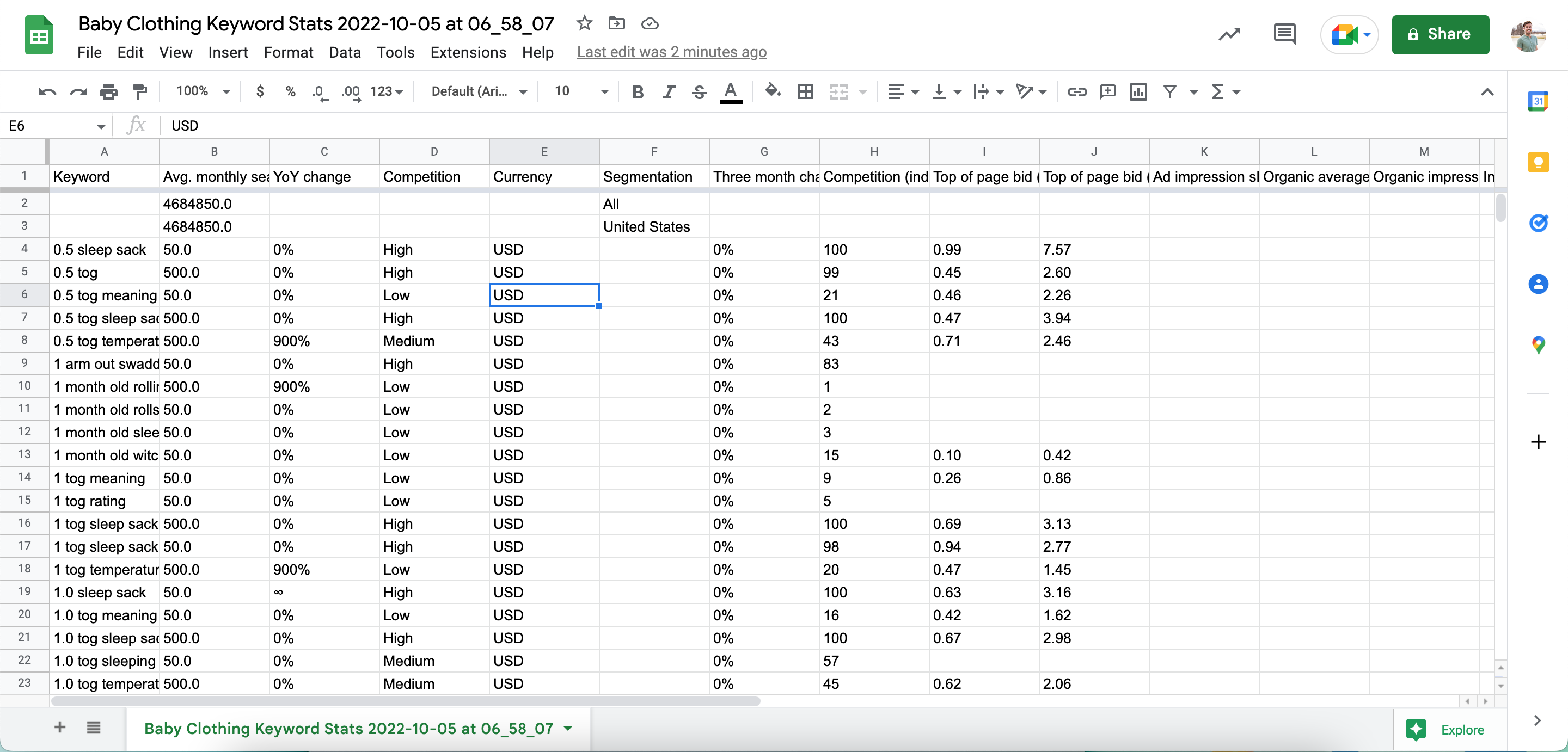
Once you've done your keyword research, it's important to export and organize your data so you can easily access and use it later. The Google Keyword Planner allows you to export your keyword data in a CSV file, which can then be opened in a spreadsheet program like Excel or Google Sheets.
- Export Your Data: Simply click the "Download keyword ideas" button in the top right corner of the Keyword Planner.
- Organize Your Spreadsheet: Once you've opened the CSV file, you can organize your data by keyword, average monthly searches, competition level, and other relevant metrics.
- Create Keyword Groups: Group similar keywords together to create keyword clusters. This will make it easier to target those keywords with specific pieces of content.
- Prioritize Your Keywords: Based on your analysis, prioritize your keywords based on their potential traffic, competition level, and relevance to your business.
Think of your spreadsheet as your master keyword list. It's a living document that you can update and refine as you continue your keyword research and track your website's performance.
By following these steps, you can master the Google Keyword Planner and start using it to find the perfect keywords for your website or business. Remember to be patient and persistent, and don't be afraid to experiment with different keywords and targeting options. With a little practice, you'll be driving more traffic to your website in no time!
Frequently Asked Questions About Google Keyword Planner
Let's tackle some common questions about the Google Keyword Planner to further solidify your understanding:
- Is the Google Keyword Planner really free?
Yes and no. While you can access the Keyword Planner with a Google Ads account (which is free to create), the data you see might be limited if you're not actively running ad campaigns. Google tends to provide more precise data to active advertisers. However, even with limited data, the Keyword Planner is still a valuable tool for keyword research.
- How often should I update my keyword research?
Keyword research is an ongoing process. Search trends and user behavior change constantly, so it's important to update your keyword research regularly. I recommend reviewing your keyword list at least once a quarter, or more frequently if you're in a rapidly changing industry.
- What's the difference between long-tail keywords and short-tail keywords?
Short-tail keywords are broad, general terms (e.g., "coffee"). Long-tail keywords are more specific and longer phrases (e.g., "best organic coffee beans for French press"). Long-tail keywords typically have lower search volume but also lower competition, making them easier to rank for. They also tend to attract more qualified traffic.
- Can I use the Google Keyword Planner for competitor analysis?
Yes, to some extent. You can enter your competitor's website URL into the "Discover New Keywords" tool to see what keywords they might be targeting. However, keep in mind that the Keyword Planner only provides suggestions based on your competitor's website content. It doesn't give you a complete picture of their keyword strategy.
Hopefully, these answers have cleared up any remaining questions you might have. Now, let’s wrap things up!
You've made it to the end, champion! We've covered a lot of ground, from accessing the Google Keyword Planner to understanding keyword match types and leveraging location targeting. The Google Keyword Planner is a powerful tool that can help you unlock your SEO potential and drive more traffic to your website.
Remember, keyword research is an ongoing process. Don't be afraid to experiment, analyze your results, and adapt your strategy as needed. The more you use the Keyword Planner, the more comfortable you'll become with its features and the better you'll get at finding the perfect keywords for your business.
So, what's your next step? I challenge you to log into the Google Keyword Planner right now and start exploring. Try entering a few keywords related to your business and see what you discover. Don't be afraid to play around with the filters and targeting options. The best way to learn is by doing!
Now go forth and conquer the world of keywords! Remember, every successful online journey starts with a single search. And with the Google Keyword Planner in your arsenal, you're well-equipped to navigate the ever-changing landscape of the internet and reach your target audience. Are you ready to take your SEO to the next level? I know you are!

Post a Comment for "Step-by-Step Guide to Using Google Keyword Planner"
Post a Comment