How to Use Google Sheets for Budget Tracking
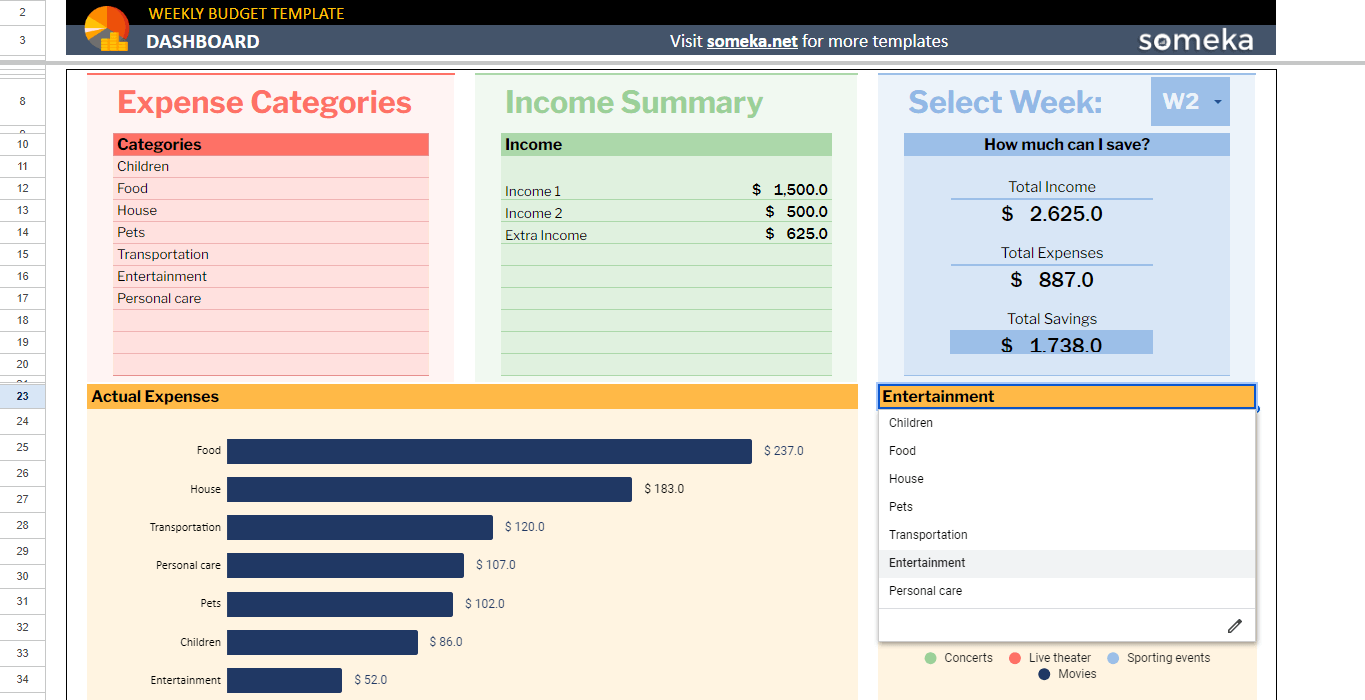
Unlock Financial Freedom: Mastering Budget Tracking with Google Sheets
Hey there, savvy savers and budget buffs! Ever feel like your money's playing hide-and-seek, and you're always the one doing the searching? We've all been there. One minute, you're feeling flush after payday, and the next, you're wondering where it all went. It’s like your bank account has a secret teleportation device that whisks your hard-earned cash away to… who knows where! Maybe it's that daily latte habit whispering sweet nothings, or perhaps those irresistible online shopping deals that justscreamyour name.
But fear not, friends! I'm about to let you in on a little secret weapon that can transform you from a financial free-for-all into a budgeting boss. And the best part? It's likely already at your fingertips: Google Sheets! Yes, that humble spreadsheet program you might associate with dull data entry can actually be your ultimate financial sidekick. Think of it as your digital money manager, always ready to help you track your spending, identify areas for improvement, and ultimately, achieve your financial goals.
Now, I know what you might be thinking: "Spreadsheets? Sounds complicated and boring!" Trust me, I get it. The word "spreadsheet" alone can trigger flashbacks to tedious accounting classes. But believe me, using Google Sheets for budget tracking is surprisingly simple and even… dare I say… enjoyable? Okay, maybe notenjoyablein the skydiving-over-the-Grand-Canyon kind of way, but definitely more satisfying than staring blankly at your bank statement, wondering where your paycheck vanished to.
Think of it this way: imagine having a clear, real-time snapshot of your financial life, all neatly organized in one place. No more guessing games, no more head-in-the-sand avoidance tactics. Just cold, hard data that empowers you to make informed decisions about your money. You can see exactly where your money is going, identify potential leaks in your spending, and create a realistic plan to achieve your financial dreams, whether it's paying off debt, saving for a down payment on a house, or finally taking that dream vacation to Bali.
We're not talking about some complicated, pre-built budgeting software that costs a fortune and requires a Ph D in finance to understand. We're talking about a customizable, flexible tool that you can tailor to your specific needs and preferences. And the best part? It's free! Google Sheets is included with your Google account, so you already have everything you need to get started.
But why Google Sheets, you ask? Well, for starters, it's accessible from anywhere with an internet connection. Whether you're on your laptop, tablet, or even your smartphone, you can easily update your budget on the go. Plus, it's incredibly versatile. You can create simple spending trackers or complex financial dashboards, depending on your needs and level of spreadsheet expertise. And if you're feeling overwhelmed, don't worry! There are tons of free templates and tutorials available online to help you get started.
In this article, we're going to break down the process of using Google Sheets for budget tracking into easy-to-follow steps. We'll cover everything from setting up your spreadsheet to creating custom categories to visualizing your spending with charts and graphs. We'll also share some tips and tricks to help you maximize the power of Google Sheets and stay on top of your financial game.
So, are you ready to ditch the financial confusion and take control of your money? Are you ready to unlock the power of Google Sheets and transform yourself into a budgeting superstar? Then buckle up, friends, because we're about to embark on a journey to financial freedom, one spreadsheet cell at a time. Keep reading to discover how Google Sheets can become your secret weapon for financial success!
Unleash Your Inner Accountant: A Deep Dive into Google Sheets Budgeting
Alright, let’s dive into the nitty-gritty of crafting a budget that actually works. Not just some theoretical exercise, but a living, breathing document that guides your spending decisions and helps you achieve your financial aspirations. We're moving beyond the generalities and getting into actionable steps you can implement today.
The most important thing to realize is that budgeting isn't about restriction; it's about empowerment. It's about knowing where your money is going so you can make conscious choices about how to spend it. Think of it like planning a road trip: you wouldn't just hop in the car and start driving aimlessly, would you? You'd plan your route, estimate your gas costs, and maybe even book some hotels along the way. Budgeting is the same thing, but for your financial life.
Setting Up Your Google Sheet: The Foundation of Your Financial Fortress
- Create a New Spreadsheet: Seems obvious, right? But it's the first step! Open Google Sheets and start a blank spreadsheet. Give it a descriptive name like "My Monthly Budget" or "Financial Tracking 2024." This makes it easy to find later. Think of this as laying the foundation for your financial empire.
- Define Your Income Streams: This is where you list all the sources of money coming in. For most of us, this will include your salary, but don't forget about side hustles, freelance income, investments, or even that occasional birthday money from Grandma! Create a column for "Income Source" and another for Amount.Be realistic! Don't overestimate potential income.
- Categorize Your Expenses: This is where the real magic happens. You need to break down your spending into meaningful categories. Don't just lump everything into Miscellaneous.Think about where your money actually goes. Here are some common categories to get you started:
- Housing (Rent/Mortgage, Property Taxes, Insurance)
- Transportation (Car Payment, Gas, Public Transportation, Maintenance)
- Food (Groceries, Dining Out)
- Utilities (Electricity, Water, Gas, Internet, Phone)
- Entertainment (Movies, Concerts, Hobbies)
- Debt Payments (Credit Cards, Student Loans)
- Savings (Emergency Fund, Investments, Retirement)
- Personal Care (Haircuts, Gym Memberships)
- Healthcare (Insurance Premiums, Doctor Visits)
- Housing (Rent/Mortgage, Property Taxes, Insurance)
- Structure Your Spreadsheet: Now, let's put it all together. Create columns for: "Date," "Description," "Category," "Budgeted Amount," "Actual Amount," and Difference.This structure will allow you to track your spending over time and compare it to your budget.
Tracking Your Spending: Become a Financial Detective
- Enter Transactions Regularly: The key to effective budgeting is consistency. Make it a habit to enter your transactions at least a few times a week. The more frequently you update your spreadsheet, the more accurate your data will be.
- Use Mobile Apps: Many banks and credit card companies offer mobile apps that allow you to track your spending on the go. You can even export your transaction data as a CSV file and import it into Google Sheets.
- Automate Where Possible: Explore options for automating data entry. Services like Tiller Money can automatically import your transactions into Google Sheets, saving you time and effort.
- Be Specific with Descriptions: Don't just write "Grocery Store." Write "Grocery Store - Trader Joe's" or "Grocery Store - Fresh Market." This will help you remember what you bought and categorize your spending more accurately.
Analyzing Your Data: Uncover Hidden Spending Habits
- Calculate Totals: Use the SUM function in Google Sheets to calculate your total income, expenses, and savings for each month. This will give you a clear overview of your financial situation.
- Visualize Your Spending: Create charts and graphs to visualize your spending patterns. A pie chart showing the percentage of your income spent on each category can be incredibly insightful. Google Sheets makes it easy to create these visualizations with just a few clicks.
- Identify Areas for Improvement: Once you have a clear picture of your spending, you can start to identify areas where you can cut back. Are you spending too much on dining out? Are there subscriptions you're not using? Look for those leaks and plug them!
- Use Conditional Formatting: Set up conditional formatting to highlight areas where you're overspending. For example, you can highlight any "Difference" cell that is negative (meaning you spent more than you budgeted) in red.
Advanced Techniques: Level Up Your Budgeting Game
- Create a Rolling Budget: A rolling budget is a budget that is constantly updated. Each month, you add a new month to the end of your budget and remove the oldest month. This allows you to plan for the future while still keeping your budget relevant to your current financial situation.
- Use the GOOGLEFINANCE Function: The GOOGLEFINANCE function allows you to pull real-time stock prices and other financial data directly into your spreadsheet. This can be useful for tracking your investments and calculating your net worth.
- Experiment with Different Budgeting Methods: There are many different budgeting methods you can try, such as the 50/30/20 rule (50% of your income goes to needs, 30% goes to wants, and 20% goes to savings and debt repayment) or the zero-based budget (where you allocate every dollar of your income to a specific category). Find the method that works best for you.
- Collaborate with Your Partner: If you're in a relationship, budgeting together can be a powerful way to improve your financial health. Google Sheets makes it easy to collaborate on a budget with your partner in real time.
Staying Consistent: The Key to Long-Term Success
- Review Your Budget Regularly: Don't just set it and forget it! Make it a habit to review your budget at least once a month to see how you're doing and make any necessary adjustments.
- Be Flexible: Life happens! Unexpected expenses will inevitably pop up. Don't get discouraged if you go over budget occasionally. Just adjust your budget accordingly and get back on track.
- Celebrate Your Successes: When you achieve a financial goal, like paying off a debt or reaching a savings milestone, take some time to celebrate your success! This will help you stay motivated and continue on your path to financial freedom.
- Don't Be Afraid to Ask for Help: If you're struggling with budgeting, don't be afraid to ask for help from a financial advisor or a trusted friend or family member. There are also many online resources available to help you learn more about budgeting.
Remember, friends, budgeting is a journey, not a destination. There will be ups and downs along the way. The key is to stay consistent, be flexible, and celebrate your successes. With Google Sheets as your trusty companion, you can take control of your finances and achieve your dreams!
Frequently Asked Questions about Google Sheets Budgeting
Got some burning questions about using Google Sheets for budget tracking? You're not alone! Here are some common questions I get asked all the time:
- Question 1: I'm a complete beginner with spreadsheets. Is Google Sheets really easy enough for me to use for budgeting?
- Answer: Absolutely! While Google Sheets can seem intimidating at first, the basics are surprisingly easy to pick up. Focus on the core functions like entering data, using the SUM function for totals, and creating simple charts. There are tons of free tutorials online specifically for beginners, so don't be afraid to dive in and experiment. Start with a simple template and gradually customize it to fit your needs. Remember, everyone starts somewhere!
- Question 2: How often should I be updating my Google Sheets budget? Is once a month enough?
- Answer: While updating your budget once a month is better than nothing, I recommend updating it more frequently, ideally a few times a week. The more often you track your spending, the more accurate your data will be and the quicker you'll be able to identify potential problems. Think of it like brushing your teeth – you wouldn't just brush them once a month, would you? Regular maintenance is key!
- Question 3: I have a lot of irregular income. How can I use Google Sheets to budget effectively when my income fluctuates?
- Answer: Irregular income can definitely make budgeting more challenging, but it's still possible! One strategy is to estimate your income conservatively. Base your budget on your lowest expected income for the month. Then, when you receive extra income, you can allocate it to savings, debt repayment, or discretionary spending. Another approach is to use a rolling budget, which allows you to adjust your budget as your income changes.
- Question 4: Are there any good Google Sheets templates specifically designed for budgeting that I can use as a starting point?
- Answer: You bet! There are tons of free and paid Google Sheets templates available online. Just search for "Google Sheets budget template" and you'll find a variety of options. Look for templates that are well-organized, easy to use, and customizable to fit your needs. Some popular templates include those offered by Google themselves, as well as templates from personal finance bloggers and websites.
Take Control of Your Finances Today!
So, there you have it! A comprehensive guide to using Google Sheets for budget tracking. We've covered everything from setting up your spreadsheet to tracking your spending to analyzing your data. You now have the tools and knowledge you need to take control of your finances and achieve your financial goals.
The core of this whole thing? It's all about knowing where your money is going. Once you have that visibility, you can make informed decisions about your spending, identify areas for improvement, and create a realistic plan to achieve your dreams. Whether it's paying off debt, saving for a down payment, or taking that dream vacation, Google Sheets can be your trusty companion on your journey to financial freedom.
Now, here's your call to action: Open up Google Sheets right now and start creating your budget! Don't wait another day to take control of your finances. Start with a simple template, customize it to fit your needs, and start tracking your spending. You'll be amazed at how quickly you can gain control of your money and start making progress towards your financial goals.
Remember, financial freedom is within your reach. With a little effort and the power of Google Sheets, you can achieve anything you set your mind to. So go out there, be financially responsible, and remember: will you let your money work for you, or will you work for money for the rest of your life?

Post a Comment for "How to Use Google Sheets for Budget Tracking"
Post a Comment