How to Use Google Ads Keyword Planner for PPC Campaigns
Unlocking PPC Success: A Comprehensive Guide to Mastering Google Ads Keyword Planner
Hey there, fellow marketers and aspiring PPC gurus! Ever feel like your Google Ads campaigns are just… floating? Like you're throwing money into the digital abyss and hoping something sticks? We've all been there. It's like trying to bake a cake without a recipe – you might end up with something edible, but chances are it's going to be a far cry from that perfectly frosted masterpiece you envisioned. The secret ingredient, my friends, is the Google Ads Keyword Planner. And trust me, it’s not nearly as intimidating as it sounds.
Think of the Keyword Planner as your trusty compass in the vast, often confusing, world of online advertising. Without it, you're essentially wandering aimlessly, targeting keywords based on gut feeling or, even worse, competitor envy. Imagine you're selling artisanal dog sweaters (because, why not?). Youthinkeveryone is searching for "cute dog clothes," so you pour your budget into that keyword. But what if your ideal customers areactuallysearching for "small breed puppy sweaters" or "dachshund winter apparel"? You'd be missing out on a whole segment of potential buyers, and wasting a good chunk of your budget in the process. Ouch!
Or picture this: you’re a local bakery trying to attract customers. You might assume "bakery" is the golden ticket keyword. But what if people are specifically searching for "vegan cupcakes near me" or "custom birthday cakes [your city]"? By not tapping into those specific, high-intent keywords, you're leaving money on the table for your competitors (the dastardly donut shop down the street!).
The Keyword Planner is like having a secret peek into the minds of your potential customers. It reveals what they'reactuallysearching for, how much competition there is for those keywords, and even suggests related keywords you might not have even considered. It's like having a focus group at your fingertips, 24/7.
But the Keyword Planner is more than just a keyword suggestion tool. It's a powerful research hub that can help you understand market trends, analyze competitor strategies, and even predict future search volumes. Think of it as your data-driven crystal ball for PPC success.
So, are you ready to ditch the guesswork and start building data-backed, highly effective Google Ads campaigns? Then buckle up, my friends, because we're about to dive deep into the wonderful world of the Google Ads Keyword Planner! We’ll break down everything from the basics to advanced strategies, ensuring you can confidently navigate this powerful tool and unlock your PPC potential. Get ready to transform your campaigns from "meh" to "magnificent"! Intrigued? Let’s begin!
Mastering the Google Ads Keyword Planner: A Step-by-Step Guide
Ready to transform your PPC campaigns from budget-draining guesses to laser-targeted successes? Let's jump into a detailed walkthrough of how to use the Google Ads Keyword Planner. Think of this as your comprehensive guide, filled with actionable insights and real-world examples.
Accessing the Keyword Planner: Your Gateway to Keyword Nirvana
- First things first, you'll need a Google Ads account. If you don't have one already, head over to ads.google.com and sign up. Don't worry, you don't have to launch a campaign immediately.
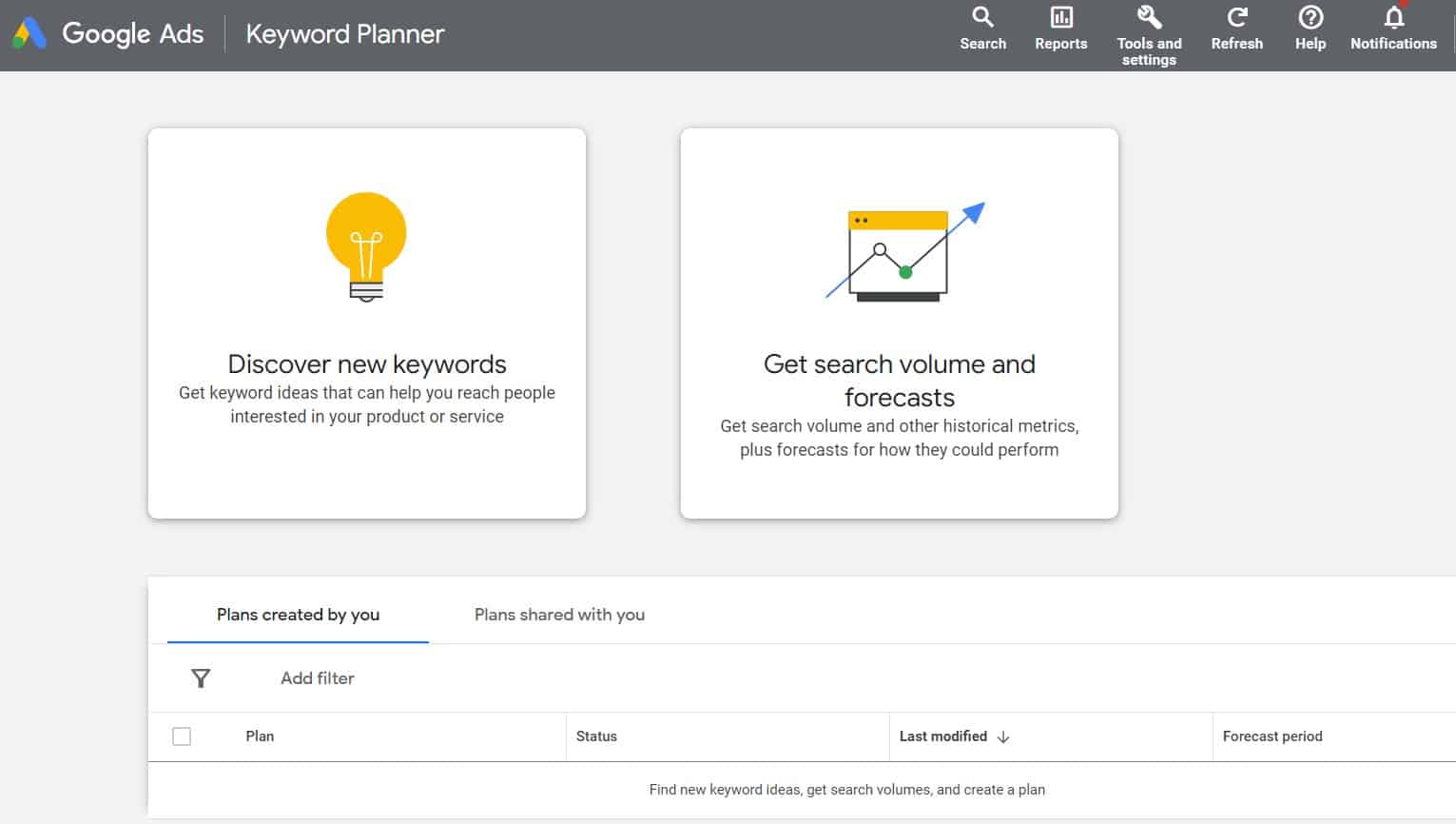
- Once you're logged in, look for the "Tools & Settings" icon in the top right corner. It usually looks like a wrench or a gear.
- Click on "Tools & Settings," and you'll see a dropdown menu. Under "Planning," you'll find the glorious "Keyword Planner." Click it!
Keyword Discovery: Unearthing Hidden Gems
- Once you're in the Keyword Planner, you'll see two main options: "Discover new keywords" and "Get search volume and forecasts." Let's start with "Discover new keywords." This is where the magic happens.
- Enter your product or service. Think about what your business offers and what terms people might use to find it. Remember our artisanal dog sweaters? You might start with "dog sweaters," "puppy sweaters," "dog clothes," etc. The more relevant seed keywords you enter, the better the results.
- Targeting is Key. Select your target location and language. If you're a local bakery, you'll want to target your city or region. If you're selling internationally, you can target multiple countries or even the whole world.
- Filter like a pro. Use the filters to refine your search. You can exclude keywords that aren't relevant (e.g., if you only sell sweaters, exclude "dog shoes"). You can also filter by average monthly searches, competition, and ad impression share.
- Analyze the results. The Keyword Planner will generate a list of keyword suggestions, along with their average monthly searches, competition level, and estimated cost-per-click (CPC). This is where you start identifying those hidden gems that your competitors might be missing.
Understanding Keyword Metrics: Decoding the Data
- Average Monthly Searches: This tells you how many people are searching for a particular keyword each month. Generally, higher search volume means more potential traffic. But remember, high volume also means more competition.
- Competition: This indicates how many advertisers are bidding on a particular keyword. "High" competition usually means it will be more expensive to rank for that keyword. "Low" competition might indicate an opportunity to snag some cheap traffic.
- Top of Page Bid (Low Range) & Top of Page Bid (High Range): This gives you an idea of how much you'll need to bid to appear at the top of the search results for that keyword. The range reflects the different bid strategies used by advertisers.
- Pro Tip: Don't solely focus on high-volume keywords. Sometimes, long-tail keywords (longer, more specific phrases) can be incredibly valuable. For example, "organic gluten-free dog treats for sensitive stomachs" might have lower search volume than "dog treats," but it's also likely to attract highly qualified customers who are ready to buy.
Keyword Grouping: Organizing Your Campaign for Success
- Theme-Based Grouping. Group keywords based on themes or categories. For example, if you're selling both dog sweaters and dog jackets, you might create separate ad groups for each category.
- Intent-Based Grouping. Group keywords based on user intent. Are people searching for information ("what is the best dog sweater for winter") or are they ready to buy ("buy dog sweater online")? Create separate ad groups to target these different intents.
- Location-Based Grouping. If you're targeting multiple locations, create separate ad groups for each location. This allows you to tailor your ads and landing pages to each specific region.
- Singular Keyword Ad Groups (SKAGs): This advanced strategy involves creating ad groups with only one keyword. While it requires more effort, it allows for highly targeted ads and landing pages, leading to better Quality Scores and lower costs.
Getting Search Volume and Forecasts: Predicting Future Performance
- Ready to predict the future (well, sort of)? The "Get search volume and forecasts" option in the Keyword Planner allows you to upload a list of keywords and see how they're likely to perform.
- Upload Your Keywords. Simply paste or upload your keyword list into the tool.
- Set Your Budget and Bids. Enter your daily budget and maximum CPC bids to get an estimate of how many clicks and impressions you can expect.
- Analyze the Forecast. The Keyword Planner will generate a forecast showing you the estimated clicks, impressions, cost, and conversions you can expect based on your chosen keywords, budget, and bids.
- Adjust and Optimize. Use the forecast to adjust your keyword selection, budget, and bids. Experiment with different scenarios to see how they impact your potential results.
- Pro Tip: Keep in mind that these forecasts are just estimates. Actual performance may vary depending on factors such as seasonality, competition, and ad quality. Regularly monitor your campaigns and make adjustments as needed.
Leveraging Keyword Planner for Competitor Analysis: Spying on the Competition (Ethically!)
- While the Keyword Planner isn't specifically designed for competitor analysis, you can use it to gain valuable insights into your competitors' strategies.
- Enter Competitor Keywords. Think about the keywords your competitors are likely targeting. Enter those keywords into the Keyword Planner and see what other keywords it suggests. This can reveal keywords your competitors are using that you haven't even considered.
- Analyze Competitor Landing Pages. Take a look at your competitors' landing pages and see what keywords they're using. Enter those keywords into the Keyword Planner to see their search volume and competition level.
- Identify Keyword Gaps. Look for keywords that your competitors arenottargeting. These represent potential opportunities for you to gain a competitive advantage.
- Pro Tip: Don't just blindly copy your competitors' strategies. Use the Keyword Planner to identify opportunities to differentiate yourself and stand out from the crowd.
Advanced Strategies: Taking Your Keyword Planner Skills to the Next Level
- Utilize Keyword Planner API. For advanced users, the Keyword Planner API allows you to automate keyword research and integrate it into your own tools and workflows.
- Combine with Other Tools. Combine the Keyword Planner with other tools like Google Analytics, Google Search Console, and SEMrush for a more comprehensive view of your keyword performance.
- Stay Updated. Google Ads and the Keyword Planner are constantly evolving. Stay updated on the latest features and best practices to maximize your results.
By following these steps and implementing these strategies, you'll be well on your way to mastering the Google Ads Keyword Planner and creating highly successful PPC campaigns. Remember, keyword research is an ongoing process. Continuously monitor your campaigns, analyze your data, and make adjustments as needed. Happy advertising!
Frequently Asked Questions (FAQ)
Still have questions about the Google Ads Keyword Planner? You're not alone! Here are some frequently asked questions to help you further master this powerful tool:
- Question 1: Is the Google Ads Keyword Planner really free to use?
Answer: Yes and no. The Keyword Planner is free to use if you have a Google Ads account. However, if you're not running active campaigns, the data you see will be less precise and presented in broader ranges. To unlock the full potential of the tool and get more granular data, you'll need to be running active campaigns. - Question 2: How often should I update my keyword research?
Answer: Keyword research should be an ongoing process. The search landscape is constantly changing, so it's important to regularly review and update your keyword list. At a minimum, you should review your keyword research every quarter. However, if you're in a rapidly changing industry, you may need to review it more frequently. - Question 3: What's the difference between broad match, phrase match, and exact match keywords?
Answer: These are different keyword match types that control how closely your keywords match the search terms people are using. Broad match is the most flexible, allowing your ads to show for a wide range of related searches. Phrase match is more targeted, showing your ads for searches that include the meaning of your keyword. Exact match is the most restrictive, showing your ads only for searches that exactly match your keyword. Choosing the right match type depends on your goals and budget. - Question 4: How important is Quality Score in Google Ads?
Answer: Quality Score is extremely important! It's a metric that Google uses to assess the quality and relevance of your ads and landing pages. A higher Quality Score can lead to lower costs and better ad positions. Keyword research plays a crucial role in improving your Quality Score by ensuring that your keywords are relevant to your ads and landing pages.
Conclusion: Your Journey to PPC Mastery Begins Now
Alright, friends, we've reached the end of our deep dive into the Google Ads Keyword Planner! Hopefully, you're now armed with the knowledge and confidence to tackle your PPC campaigns like a seasoned pro. We've covered everything from accessing the Keyword Planner to understanding keyword metrics, grouping keywords effectively, predicting future performance, analyzing competitors, and even exploring advanced strategies.
Remember, the Google Ads Keyword Planner is more than just a tool – it's your secret weapon for unlocking PPC success. It's your data-driven compass, guiding you through the often-turbulent waters of online advertising. By mastering this tool, you can transform your campaigns from guesswork to precision, maximizing your ROI and achieving your business goals.
So, what's your next step? It's time to put your newfound knowledge into action! Log into your Google Ads account (or create one if you haven't already), fire up the Keyword Planner, and start exploring. Experiment with different keywords, analyze the data, and refine your strategy.
Don't be afraid to make mistakes. PPC is a learning process, and the best way to improve is by doing. And hey, if you get stuck, come back to this guide. We're here to support you on your journey to PPC mastery.
Now go forth and conquer the world of Google Ads! Start planning those keywords and remember: the best campaigns are built on data, not assumptions. What exciting keywords are you eager to explore first?

Post a Comment for "How to Use Google Ads Keyword Planner for PPC Campaigns"
Post a Comment