Beginner’s Guide to Creating Instagram Shopping
Unlock Your Sales Potential: A Beginner's Guide to Instagram Shopping
Hey there, future Instagram tycoons! Ever scroll through your Insta feed, drooling over a cute dress or a must-have gadget, and wish you could just...buy it right then and there? Well, guess what? That's the magic of Instagram Shopping, and it's not just for big brands anymore. It's within your reach, and we're here to show you how to grab it!
Think about it: you're already building a community, sharing amazing photos and videos, and connecting with potential customers. Why not make it even easier for them to support your business? Instead of sending them on a scavenger hunt to your website, you can let them purchase directly from your posts and stories. It's like having a virtual storefront right in their pockets, open 24/7.
But maybe you're thinking, "Instagram Shopping? Sounds complicated!" Trust us, we get it. The world of e-commerce can seem overwhelming. But that’s where this guide comes in! We're breaking down the process into easy-to-follow steps, so you can transform your Instagram account into a sales-generating machine, even if you're a complete beginner. So, ready to turn those likes into sales? Let's dive in!
Level Up Your Insta Game: Your Guide to Instagram Shopping Success

So, you're ready to jump into the world of Instagram Shopping? Awesome! Let's get you set up for success with a breakdown of everything you need to know, from eligibility to tagging those irresistible products.
Is Instagram Shopping Right for You? Check Your Eligibility!

Before we get too excited, let's make sure you meet the requirements for Instagram Shopping. It's like checking if you have the right ingredients before you start baking a cake. Here's the checklist:
• You need to have a business account on Instagram. If you're still rocking a personal profile, it's time to switch! It's free, easy, and unlocks a ton of useful features.
• Your business needs to comply with Instagram's commerce policies. Basically, make sure you're selling legit products and playing by the rules.
• You need to be located in a supported market. Most major countries are on the list, but it's always good to double-check.
• Your Instagram account needs to be connected to a Facebook catalog. Don't worry, we'll walk you through this process!
• Ensure your domain is verified. This is to make sure you own the domain your website is using and prevent any fraudulent activities.
Real-World Example: Let's say you're a small, handmade jewelry business. You've been using your personal Instagram to showcase your creations, but now you're ready to take things to the next level. Switching to a business account not only allows you to use Instagram Shopping, but also provides valuable insights into your audience, like their age, gender, and location. This information can help you tailor your content and reach even more potential customers.
Setting Up Shop: Connecting Your Facebook Catalog
This might sound a little techy, but it's actually pretty straightforward. Your Facebook catalog is basically a digital inventory of all the products you want to sell on Instagram. Here's how to connect it:
• Use Commerce Manager: This is Facebook’s dedicated hub for managing your shop. It offers a streamlined interface to handle everything in one place.
• Choose a catalog: If you already have a catalog in Facebook Business Manager, you can connect it directly. If not, you can create a new one.
• Populate your catalog: Add your products manually, or import them using a data feed or pixel. Make sure to include high-quality images, detailed descriptions, and accurate prices.
Pro Tip: Consistency is key! Make sure the information in your Facebook catalog matches the information on your website. This will prevent any confusion for your customers and ensure a smooth shopping experience.
Showcase Your Products: Mastering Product Tagging
This is where the magic happens! Product tagging allows you to directly link products in your posts and stories to their corresponding pages in your Facebook catalog. Here's how to do it:
• Create a post or story: As usual, upload your photo or video. Make sure it showcases your product in an appealing way!
• Tag the product: Tap on the product in your image, and search for it in your catalog.
• Add a product sticker to stories: Just like adding a hashtag or location, you can add a product sticker to your stories.
• Include a call to action: Encourage your followers to "Shop Now" or "Tap to view."
Example: Imagine you're posting a photo of a delicious-looking smoothie. You can tag the specific ingredients used in the smoothie, like the protein powder or the blender. This allows your followers to easily purchase those items and recreate your recipe at home!
Level Up Your Content: Optimizing for Sales
Now that you know how to set up Instagram Shopping, let's talk about how to make your content even more effective at driving sales.
• Use high-quality images and videos: Visuals are everything on Instagram. Make sure your product photos are well-lit, clear, and visually appealing.
• Write compelling captions: Tell a story! Don't just list the features of your product. Highlight the benefits and how it can solve a problem for your customers.
• Use relevant hashtags: Hashtags help people discover your products. Research popular hashtags in your niche and use them strategically.
• Run engaging contests and giveaways: Everyone loves a freebie! Contests and giveaways are a great way to increase brand awareness and generate excitement around your products.
• Use Instagram Shopping ads: If you want to reach an even wider audience, consider running Instagram Shopping ads. You can target specific demographics and interests, ensuring your ads are seen by the people most likely to buy your products.
Remember: Building a successful Instagram Shopping strategy takes time and effort. Don't be afraid to experiment with different types of content and see what works best for your audience. Most importantly, be authentic and genuine! People can tell when you're just trying to sell them something. Focus on building relationships and providing value, and the sales will follow.
Embrace Instagram Shopping Features

To maximize your exposure and improve customer experience, utilize Instagram’s dedicated features:
• Instagram Shop Tab: Design a visually engaging storefront where users can browse products directly from your profile.
• Collections: Group products by themes or categories to help customers easily find what they're looking for.
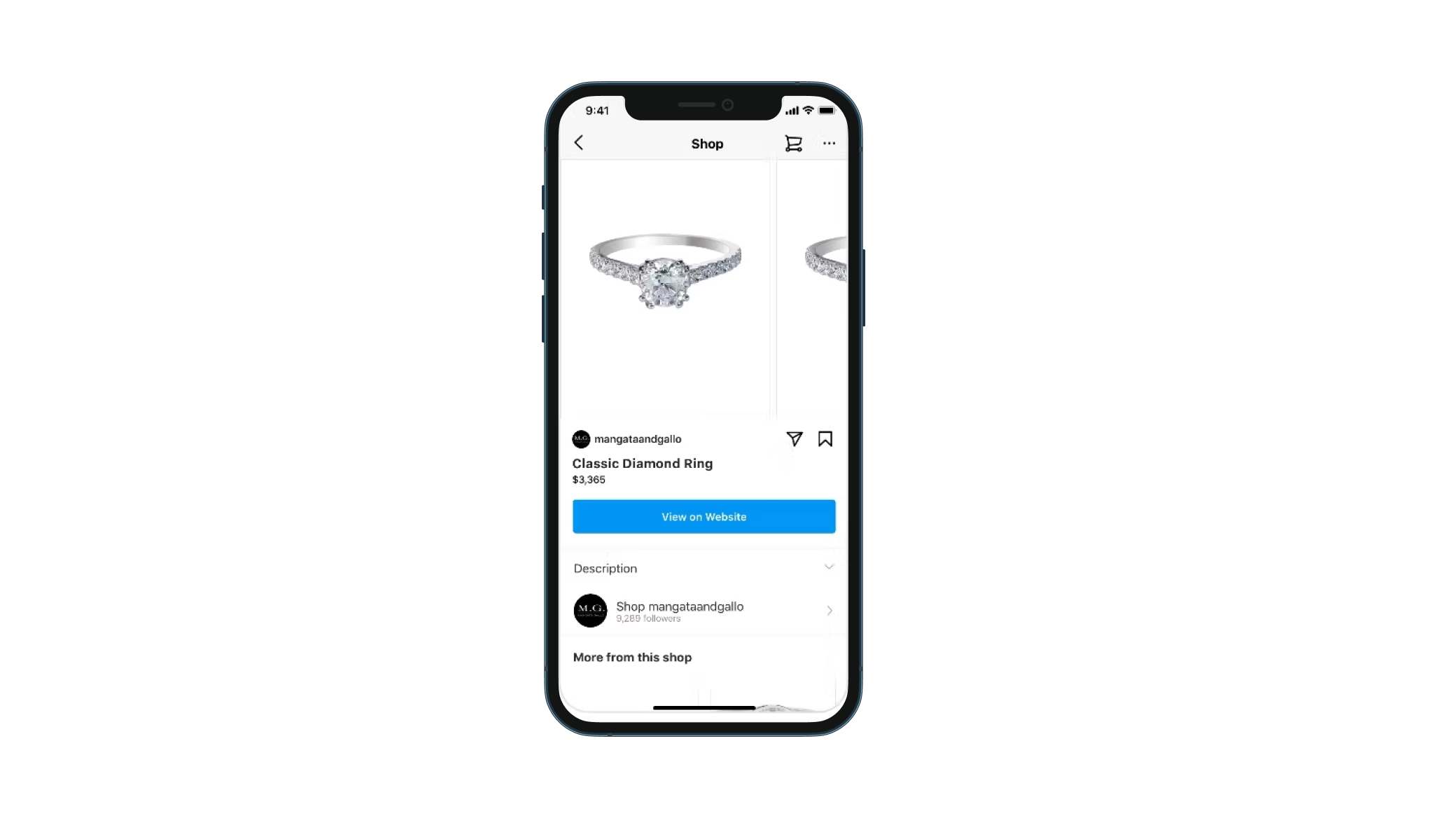
• Product Detail Pages: Provide comprehensive information including pricing, descriptions, and high-quality images.
• Shopping in Stories: Use stickers to showcase products in your stories, enabling quick and easy purchases.
• Shopping in Reels: Integrate product tagging into your Reels to capture attention and drive sales through video content.
Real-World Example: A clothing brand may use Collections to showcase different seasonal looks or style categories. Customers browsing their Instagram Shop Tab can quickly filter through options, such as "Summer Dresses" or "Winter Coats," streamlining the shopping process and enhancing overall satisfaction.
Tracking and Analytics: Know What’s Working
To see if your Instagram Shopping efforts are bearing fruit, regularly check your analytics. Instagram provides insights into:
• Product Views: Track how many times users view your products through tags and stickers.
• Product Clicks: Measure how often users click on the tagged products in your posts.
• Purchases: See how many sales you're generating directly from Instagram.
Pro Tip: Compare different product tags and posts to determine which are most effective. This information helps refine your strategy and boost your ROI.
Frequently Asked Questions (FAQs)
Still have some questions? No problem! Here are some common FAQs about Instagram Shopping:
• Q: How much does it cost to use Instagram Shopping?
• A: Instagram Shopping itself is free to use! However, you may incur costs if you choose to run Instagram Shopping ads.
• Q: Can I use Instagram Shopping if I don't have a website?
• A: While it's highly recommended to have a website to provide more information and a seamless checkout experience, it's not strictly required. You can use Instagram Shopping without a website by using Facebook Shops as your primary storefront.
• Q: How long does it take to get approved for Instagram Shopping?
• A: The approval process can vary depending on several factors, but it typically takes a few days to a few weeks. Make sure you've met all the requirements and that your information is accurate to speed up the process.
• Q: How do I handle customer service inquiries related to Instagram Shopping?
• A: Be responsive! Monitor your comments and direct messages, and address any customer inquiries promptly. Consider using a dedicated customer service tool to manage your interactions.
Conclusion: Your Instagram Shopping Journey Starts Now!

We've covered a lot of ground in this beginner's guide, but the most important thing to remember is that getting started with Instagram Shopping is easier than you think. You need to create a business profile, connect a Facebook catalog, and follow the policies set by Instagram.
So, what are you waiting for? Turn that Instagram account into a vibrant storefront and start connecting with customers in a whole new way. Don't be afraid to experiment, learn from your mistakes, and have fun along the way.
Ready to unlock your sales potential? Start setting up your Instagram Shopping account today! This is your chance to elevate your brand and drive revenue. What’s the first product you plan to tag?

Post a Comment for "Beginner’s Guide to Creating Instagram Shopping"
Post a Comment