Why Is My Phone Hot? Can You Cool It in the Fridge?
Understanding the Risks of Overheating Phones
Summer in the Valley brings scorching heat that can make steering wheels unbearably hot and create dangerous conditions for people, animals, and even devices. High temperatures can cause smartphones like iPhones to overheat, leading to potential damage or malfunction. While the risk is higher in hot cars, any smartphone can become too hot due to various factors.
How Does Your iPhone Warn You About Overheating?
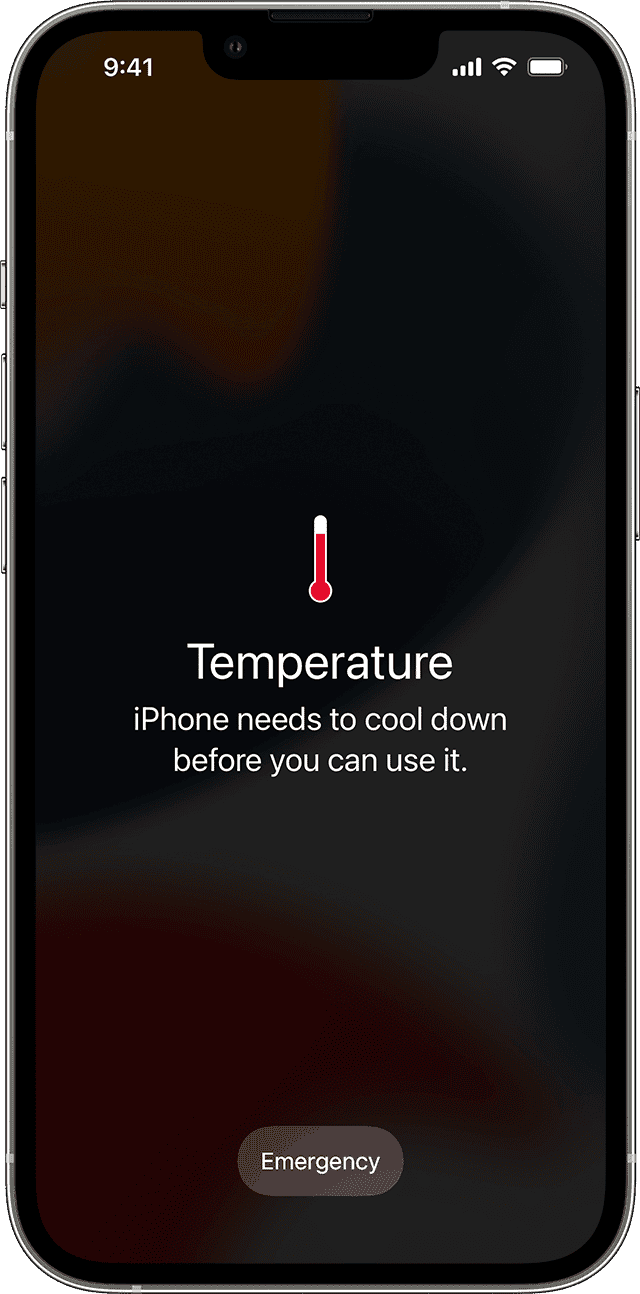
If your iPhone exceeds a certain temperature, it will display a warning message on the screen. The message typically reads, "Temperature: iPhone needs to cool down before you can use it." This is a built-in safety feature designed to protect your device from long-term damage caused by excessive heat.
What Happens When Your Phone Gets Too Hot?
When a phone becomes too hot, several issues may occur:
- Charging Issues: Charging, including wireless charging, may slow down or stop entirely.
- Display Problems: The screen might dim or darken.
- Signal Weakness: Cellular signal could weaken as radios enter a low-power state.
- Camera Restrictions: The camera flash or other camera features may be temporarily disabled.
- Performance Drops: Some apps or features may run slower with lower frame rates or increased processing times.
These symptoms are not just inconvenient—they can also indicate that your device is at risk of permanent damage.
Why Do Phones Get Hot? Should You Be Concerned?
Apple recommends using iOS and iPadOS devices in ambient temperatures ranging from 32°F to 95°F (0°C to 35°C). Extreme temperatures can cause the device to regulate its own temperature. Using your phone in very hot conditions can permanently reduce battery life, according to Apple.
Phones can also get warm during normal operations such as setting up a new device, restoring from a backup, wireless charging, running graphics-intensive apps or games, or streaming high-quality video. These situations are usually temporary, and the device should return to normal once the process is complete.
How to Cool Down an Overheated iPhone
If your iPhone displays the overheating warning, you can resume using it more quickly by following these steps:
- Turn Off the Device: Power off your iPhone to allow it to cool down.
- Move to a Cooler Environment: Place the device away from direct sunlight and in a cooler area.
- Allow It to Cool: Give your iPhone time to reach a safe temperature before using it again.
It’s important to avoid putting your iPhone in the fridge or freezer to cool it down. Doing so can lead to condensation inside the device, which can cause internal damage and moisture-related issues.
Preventing Your iPhone from Overheating
To keep your iPhone from getting too hot, avoid the following situations:
- Leaving Your Device in a Car: On a hot day, the temperature inside a car can skyrocket, risking damage to your phone.
- Exposing It to Direct Sunlight: Prolonged exposure to sunlight can cause your iPhone to overheat.
- Using Intensive Features in Hot Conditions: Activities like GPS navigation, playing graphics-heavy games, or using the camera for extended periods in hot weather can generate extra heat.
By being mindful of these factors, you can help ensure your iPhone remains in good condition and continues to function properly throughout the summer months.
Additional Tips for Keeping Your Phone Safe
In addition to avoiding the situations mentioned above, consider using a phone case that provides some level of heat resistance. Also, try to limit the use of resource-heavy apps during peak heat hours. If you’re planning to leave your phone in a vehicle, consider using a shaded parking spot or a cooling pad designed for electronic devices.
Taking these precautions can go a long way in protecting your phone from the effects of extreme heat and ensuring it stays functional when you need it most.

Post a Comment for "Why Is My Phone Hot? Can You Cool It in the Fridge?"
Post a Comment