What Is MSI's Project Zero and How Does It Stand Out?
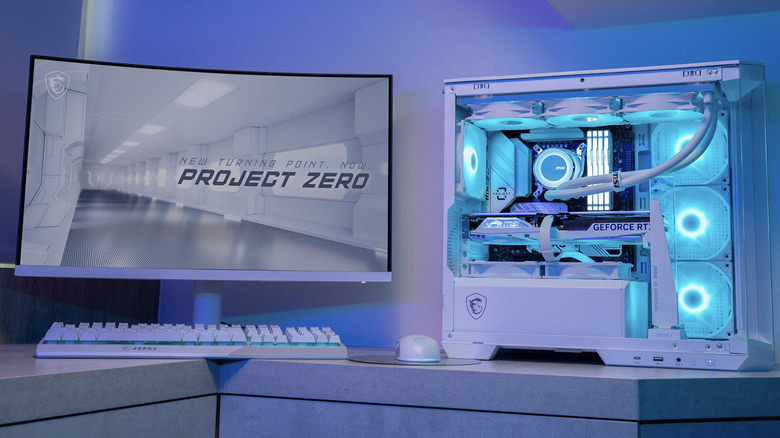
Understanding MSI's Project Zero and Its Impact on PC Building
Cable management is often considered one of the most challenging aspects of building a personal computer. It can be frustrating, overwhelming, and even daunting, especially for beginners. Even when done correctly, it doesn’t always result in a clean and organized look. This challenge has led to innovative solutions like MSI’s Project Zero (PZ) product line, which focuses on making cabling as invisible as possible.
Project Zero motherboards and cases are designed with a specific goal in mind: to streamline cable management and reduce visual clutter inside the PC. One of the key features that set these products apart is the back-connect design. Instead of placing connectors on the front or top of the motherboard, they are moved to the rear. This not only hides them from view but also makes the overall build look more polished and professional.
This design choice is not just about aesthetics. With fewer cables visible, maintaining and cleaning the PC becomes much easier. It also allows for better airflow, which can lead to improved cooling performance. The back-connect system effectively conceals several critical components, including the large 20+4-pin power connector, CPU headers, and cooling-related headers such as those for CPU fans, case fans, and water pump fans. Additionally, SATA ports, RGB and ARGB headers, and front panel connectors like the power button are all hidden.
Despite this unique approach, Project Zero is not the only solution in the market. Other manufacturers have also introduced similar designs to tackle the issue of cable management. For example, Gigabyte’s Project Stealth offers a more comprehensive ecosystem, including motherboards, cases, and even graphics cards. Asus also has its Back to the Future (BTF) lineup, which includes GPUs, motherboards, and cases.
Compatibility and Available Options
MSI has released six Project Zero motherboards, covering both Intel and AMD processors. These boards come in silver or white color schemes with black accents, and they pair well with MSI’s matching cases. There are five chassis available in white and black, offering a range of options for different builds. Some models feature a 270-degree panoramic display and support at least one 360 mm radiator on top, making them ideal for high-performance systems.
While MSI is a leading manufacturer of PC cases, other brands also offer compatible options. Third-party companies such as Corsair, InWin, Lian Li, Cooler Master, and Thermaltake support some micro-ATX (mATX) and ATX Project Zero motherboards. This means that users have a wide selection of cases to choose from, depending on their preferences and needs.
MSI’s Project Zero represents a significant shift in how cable management is approached in PC building. By prioritizing a clean and organized interior, it offers benefits beyond just visual appeal. The design helps improve airflow, simplifies maintenance, and enhances the overall user experience.
For those looking to stay updated on the latest trends in technology and automotive innovations, there are resources available that provide regular updates, expert guides, and helpful tips. Whether you're a seasoned builder or just starting out, understanding the advantages of projects like MSI’s can make a big difference in your next PC build.

Post a Comment for "What Is MSI's Project Zero and How Does It Stand Out?"
Post a Comment