Thunderbolt 5 Docking Station Review: FusionDock Pro 3 is a Powerhouse with 11 Ports and 140W Delivery
Overview of Thunderbolt 5 and Its Importance
Thunderbolt 5 is becoming a standard in the latest laptop models, whether we are fully prepared for it or not. This technology offers incredible speeds, exceptional reliability, and a range of other features that make it highly appealing. If your laptop supports Thunderbolt 5, it's wise to ensure your docking station also supports it so you can fully utilize the speed and capabilities.
The FusionDock Pro 3 from iVanky is a versatile docking solution with two distinct designs: the tower style and the deck style. The tower design stands upright, similar to the old Nintendo Wii, while the deck style resembles traditional docking stations. I opted for the deck model because it fits better into my workspace. This version includes three Thunderbolt 5 ports, a port for connecting to the laptop, 140W charging, a 2.5GbE network, multiple USB-A ports, an SD Card reader, and a headphone jack. Overall, this adds 11 ports to your MacBook Pro, Dell Pro, Lenovo, or any other laptop you may own.
One important consideration when using Thunderbolt 5-compatible docking stations is that they work with any USB-C-enabled device. However, full-speed functionality is only achievable if your machine has a Thunderbolt 5 port.
Pricing and Availability
The FusionDock Pro 3, as a tower, is priced at $459 on iVanky's website. The deck model I chose is available for $439.99 on the same site, making this powerful docking station more affordable. You can purchase the newly released docking station from iVanky’s website, Amazon, or B&H.
Unboxing and First Impressions
The FusionDock Pro 3 has a plain appearance but feels substantial and durable. The metallic casing gives it a sturdy feel, suggesting it can withstand some wear and tear. One thing that surprised me was the size of the power brick, but considering it can deliver up to 140W to my laptop, it makes sense.
Design and Build Quality
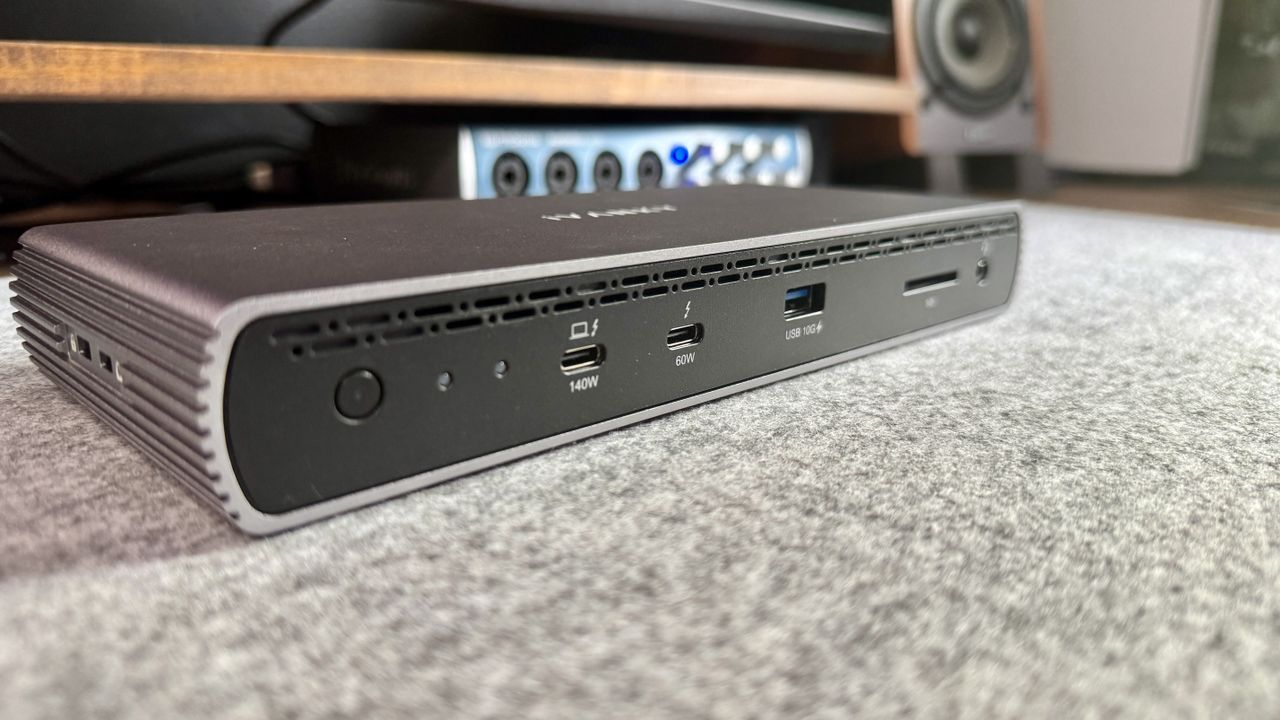
The FusionDock Pro 3 features a simple, matte metallic shell with a matte black plastic front and back, housing the ports. The port layout is straightforward and well thought out. While my personal preference for desk setups determines whether I prefer the cable connection to be at the front or back of the dock, this model has the connection at the front.
On the front of the dock, we have (from left to right) the power button, some indicator lights, the 140W port for the laptop or computer, a TB5 port, a USB-A port, the SD Card reader, and then the headphone jack. Having these readily accessible on the front is practical, and I appreciate having a TB5 port on the front. Many docks hide their TB5 ports in the back.
On the back of the dock, there is a row of three USB-A ports, an RJ45 port, two TB5 ports, and then the barrel connector. I am not a fan of barrel connectors, so I understand why some docks still use them.
Other notable features include the rubber pads on the bottom of the dock, which prevent sliding, and numerous ventilation holes that help keep the device cool during operation.
In-Use Experience
I recently purchased an M4 Pro MacBook Pro, which features a Thunderbolt 5 port, making me excited to test this docking station. I also have several laptops in for testing that feature Thunderbolt 5. During my testing, I was able to transfer files between my laptop and my Synology BeeStation as well as my Synology DS925+.
I was able to set up an entire workstation through a single dock without feeling like anything was missing. I tested single-monitor setups, dual-monitor setups, and even a triple-monitor setup using one of the laptops I have. I did need an adapter for one of the monitors, which is an important point to note.
Since this docking station does not have an HDMI or DP port, you will need adapters to connect non-USB-C displays. Most newer monitors are compatible, but if your monitor is older, you'll need an HDMI to USB-C or DisplayPort to USB-C adapter or dongle.
During testing, especially when running triple displays or transferring large files, the docking station got a bit warm, but it never became too hot or activated a fan. Watching this small dock handle such tasks at speeds that were unimaginable just a few years ago was impressive.
Attributes and Notes
- Design: Sleek and clean – ⭐⭐⭐⭐⭐
- Ease of use: Easy to use once set up – ⭐⭐⭐⭐⭐
- Practicality: Practical for TB5 users – ⭐⭐⭐⭐
- Price: Expensive, but fair – ⭐⭐⭐⭐
Final Verdict
The iVanky FusionDock Pro 3 is an impressive Thunderbolt 5 docking station with a new price and cutting-edge technology. If you don't need Thunderbolt 5, a different, more cost-effective dock might suit you better. However, if you have Thunderbolt 5 in your computer and want to maximize transfer speeds, this is a great choice for a docking station.

Post a Comment for "Thunderbolt 5 Docking Station Review: FusionDock Pro 3 is a Powerhouse with 11 Ports and 140W Delivery"
Post a Comment