How to Use Trello for Agile Project Management
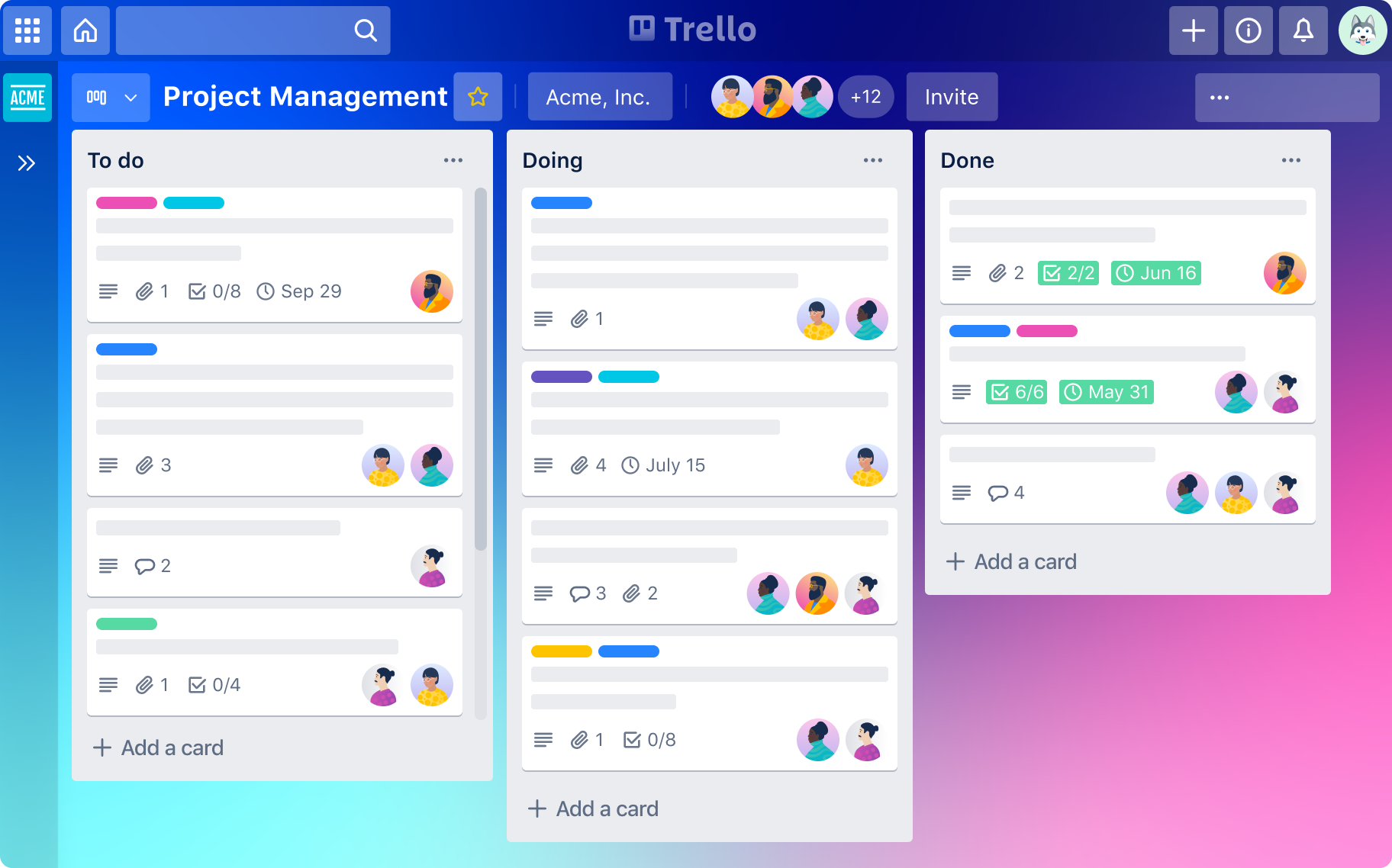
Trello for Agile: A Visual Guide to Scrum Mastery
Hey friends! Ever feel like you're juggling flaming chainsaws while riding a unicycle...blindfolded? Yeah, that's pretty much how many projects feel these days. Trying to wrangle deadlines, keep everyone on the same page, and actually, you know,get things donecan be a Herculean task. Traditional project management tools? Often clunky, confusing, and about as fun as a root canal. But what if I told you there's a better way? A way to bring order to the chaos, make your projects sing, and maybe even reclaim a little bit of your sanity?
This article, your comprehensive guide to Trello for Agile Project Management, will show you exactly that. We're going to dive deep into how you can leverage Trello, that deceptively simple and visually appealing tool, to implement Agile methodologies like Scrum and Kanban. Think of it as transforming your project management from a stressful sprint to a smooth, satisfying marathon (with plenty of water stations, of course).
Now, I know what you might be thinking: "Agile? Scrum? Kanban? Sounds like a bunch of jargon!" And you're not entirely wrong. But fear not! We'll break it all down into bite-sized, easily digestible chunks. We'll cover everything from setting up your Trello board to tracking progress, managing sprints, and collaborating effectively with your team.
The beauty of Trello lies in its flexibility. It's not just a rigid, one-size-fits-all solution. You can customize it to fit your specific needs and workflow, whether you're managing a small team or a large enterprise. It’s like Legos for project management – you can build whatever you need!
But let’s be honest, simply knowingabout Trello isn’t enough. You need to knowhowto use iteffectivelyfor Agile. That’s where this guide comes in. We'll walk you through practical examples, best practices, and pro tips that will help you become a Trello for Agile ninja in no time.
Imagine a world where project deadlines are met consistently, where team members are always aligned, and where project progress is crystal clear at a glance. Sounds pretty good, right?
So, are you ready to ditch the flaming chainsaws and embrace a more Agile approach to project management with Trello? Keep reading, because the journey to project management bliss starts now! We’ll give you the Trello Agilesecrets the gurus don't want you to know! Prepare to have your mind blown (in a good, organized, productive kind of way).
Understanding Agile and Scrum Basics
Before we jump into the nitty-gritty of using Trello, let's quickly recap the core principles of Agile and Scrum. Think of this as your Agile 101 crash course.Agileis not a specific methodology but rather a set of principles and values that emphasize iterative development, collaboration, and responding to change. It's all about being flexible and adaptable in the face of evolving requirements.Scrum, on the other hand, is a specific framework for implementing Agile.
It's structured with roles like the Product Owner, who defines what needs to be built, the Scrum Master, who facilitates the process, and the Development Team, who actually builds the thing. Scrum operates in short cycles calledsprints, typically lasting one to four weeks. During each sprint, the team works on a set of prioritized items from the product backlog. Daily Scrum meetings, or stand-ups, help the team stay aligned and address any roadblocks.
The emphasis is on frequent feedback loops, continuous improvement, and delivering value incrementally. Instead of planning everything upfront and then spending months executing, Agile and Scrum embrace an iterative approach, allowing you to adapt to changing needs and deliver working software (or whatever you're building) more quickly. This helps to implement Trello Agile Project Management.
This concept is radically different than the old waterfall style of development, where everything was planned at the beginning and rarely changed. Imagine trying to build a house this way - you would design the entire house before even laying the foundation, and you couldn't change anything without redoing the entire plan. Agile is more like building with Legos - you can easily adjust and adapt as you go.
The core values that you need to think of that come into play are; Individuals and interactions over processes and tools, Working software over comprehensive documentation, Customer collaboration over contract negotiation, and Responding to change over following a plan. Understanding these is critical to a solid understanding of Agile project management.
Why Trello is a Great Fit for Agile
So, why choose Trello for Agile? There are plenty of project management tools out there, so what makes Trello special? The answer lies in its simplicity and visual nature. Trello uses a Kanban-style board with lists and cards, which makes it incredibly easy to visualize your workflow and track progress. Each list represents a stage in your process (e.g., "To Do," "In Progress," "Done"), and each card represents a task or user story.
You can easily drag and drop cards between lists as they move through the workflow, providing a clear and intuitive view of the project's status. Trello's collaborative features also make it a great fit for Agile teams. You can assign cards to team members, add comments, attach files, and set due dates, fostering communication and transparency. Its simplicity reduces the learning curve and allows the team to focus on the work rather than wrestle with complicated software.Trello Agile Project Managementimplementation is far simpler than other project management tools.
Furthermore, Trello's flexibility allows you to customize your boards to match your specific Agile workflow. You can create custom labels, add custom fields, and integrate with other tools to extend its functionality. This means you can tailor Trello to fit your unique needs, whether you're using Scrum, Kanban, or a hybrid approach. Plus, with its accessible pricing (including a free plan), Trello is a budget-friendly option for teams of all sizes. Think of it as a project management tool that doesn't require a Ph D to use.
Trello also integrates with hundreds of other applications, such as Slack, Google Drive, and Jira. This makes it easy to connect your project management workflow with the other tools your team is already using. No need to copy and paste information between different applications; you can keep everything in one place. It's like having a Swiss Army knife for project management.
Setting Up Your Agile Trello Board
Now that you understand the basics of Agile and why Trello is a good fit, let's get practical and start setting up your Agile Trello board. The first step is to create a new board in Trello. Give it a descriptive name, such as "Project Phoenix - Sprint 1" or "Website Redesign - Kanban Board." Choose a background that appeals to you (or reflects the project's theme) to make the board visually engaging.
Next, create your lists. For a basic Scrum board, you'll typically need lists for: Backlog: This is where you store all the user stories, tasks, and ideas for the project. Think of it as your project's wish list. Sprint Backlog: During sprint planning, you'll move a selection of items from the backlog to the sprint backlog, representing the work that will be completed during the current sprint. To Do: This list contains the tasks that are ready to be worked on during the sprint. In Progress: This list shows the tasks that are currently being worked on. Review/Testing: This list is for tasks that have been completed but need to be reviewed or tested. Done: This list contains the tasks that have been successfully completed and approved.
For a Kanban board, you might have lists like: Ideas: For capturing initial ideas and suggestions. To Do: Items waiting to be worked on. In Progress: Items currently being worked on. Blocked: Items that are stuck due to a dependency or issue. Testing/Review: Items that have been completed but need to be reviewed or tested. Done: Completed items.
Remember, these are just starting points. You can customize your lists to fit your specific workflow. For example, you might add a "Waiting for Approval" list or a "Deployment" list. The key is to create a visual representation of your project's process that makes sense for your team.Trello Agile Project Managementgives you the freedom to be creative.
Once your lists are set up, start adding cards to the backlog. Each card should represent a specific task or user story. Be sure to include a clear and concise description of what needs to be done. You can also add labels, due dates, and assign the card to a team member.
Using Trello for Sprint Planning
Now that your board is set up, let's talk about how to use Trello for sprint planning in a Scrum environment. Sprint planning is a crucial meeting where the team decides which items from the product backlog will be included in the upcoming sprint.
To use Trello for sprint planning, start by reviewing the product backlog with the Product Owner. Discuss the priority of each item and clarify any questions the team may have. Once the team has a good understanding of the backlog, they can estimate the effort required for each item. This is often done using story points, which are relative units of measurement that represent the complexity, risk, and effort involved in completing a task.
You can use Trello's custom fields feature to add a "Story Points" field to each card. During sprint planning, the team can collaboratively estimate the story points for each item and enter them into the custom field.
Next, the team needs to determine their sprint capacity, which is the amount of work they can realistically complete during the sprint. This is typically based on the team's past performance and any planned absences or holidays.
Once the team knows their sprint capacity, they can start moving items from the product backlog to the sprint backlog. They should prioritize the highest-value items and ensure that they don't exceed their sprint capacity. This process is highly collaborative, with the team discussing the pros and cons of including each item in the sprint.
As items are moved to the sprint backlog, the team can break them down into smaller, more manageable tasks. Each task should be represented by a separate card in the sprint backlog. This makes it easier to track progress and identify any potential roadblocks.
Finally, the team should create a sprint goal, which is a short, descriptive statement that summarizes the overall objective of the sprint. The sprint goal should be aligned with the product vision and provide a clear focus for the team. This will help the team accomplish successful Trello Agile Project Management.
Daily Stand-ups with Trello
Daily stand-ups (or Daily Scrum meetings) are a key part of the Scrum framework. They are short, 15-minute meetings where the team members share their progress, plans, and any roadblocks they are facing. Trello can be a valuable tool for facilitating daily stand-ups and keeping the team aligned.
During the stand-up, each team member should answer three questions:
What did I do yesterday that helped the team meet the sprint goal?
What will I do today to help the team meet the sprint goal?
Are there any impediments that are preventing me or the team from meeting the sprint goal?
Trello can help answer these questions by providing a visual representation of the team's progress. Each team member can review the cards they are assigned to and quickly summarize their progress. They can also identify any cards that are blocked or need attention.
To make stand-ups even more efficient, you can use Trello's comments feature to add daily updates to each card. This allows team members to quickly see what has been done on each task and what needs to be done next.
If a team member is facing an impediment, they can add a comment to the card and tag the appropriate team member or the Scrum Master. This helps to raise awareness of the issue and ensures that it is addressed promptly.
Trello can also be used to track the team's progress over time. By reviewing the "Done" list, the team can see how much work they have completed during the sprint and identify any trends or patterns. This information can be used to improve the team's performance in future sprints. This is a major function in Trello Agile Project Management.
Remember, the goal of the daily stand-up is to keep the team aligned and identify any potential roadblocks. Trello can be a valuable tool for achieving this goal, but it's important to keep the meeting focused and efficient. Avoid getting bogged down in unnecessary details and focus on the key information that the team needs to know.
Tracking Progress and Burndown Charts
One of the benefits of using Trello for Agile project management is the ability to easily track progress and visualize the team's performance. While Trello doesn't have built-in burndown charts, there are several Power-Ups and integrations that can help you create them.
A burndown chart is a visual representation of the remaining work in a sprint over time. It shows the amount of work that the team has completed and the amount of work that is still remaining. This can be helpful for tracking progress, identifying potential delays, and making adjustments to the sprint plan.
There are several Trello Power-Ups that can generate burndown charts based on the data in your Trello board. Some popular options include: Burndown for Trello: This Power-Up allows you to create burndown charts directly within Trello. Sprintometer: This Power-Up provides a range of Agile metrics, including burndown charts, velocity charts, and cumulative flow diagrams. Corrello:Corrello is a comprehensive reporting tool for Agile teams using Trello. It includes burndown charts, cumulative flow diagrams, and other useful metrics.
To use these Power-Ups, you'll typically need to connect them to your Trello board and configure them to track the relevant data, such as story points or task estimates. Once configured, the Power-Up will automatically generate burndown charts based on the progress of your cards.Trello Agile Project Managementis improved with visual tools.
In addition to burndown charts, you can also use Trello's built-in features to track progress. For example, you can use labels to indicate the status of each card (e.g., "Blocked," "Ready for Review," "Deployed"). You can also use due dates to track deadlines and ensure that tasks are completed on time.
By regularly monitoring progress and using burndown charts, you can identify any potential issues early on and make adjustments to the sprint plan as needed. This will help you to stay on track and deliver value to your customers on time.
Review and Retrospective with Trello
The sprint review and retrospective are two important ceremonies in Scrum that help the team to learn from their experiences and improve their processes. Trello can be a valuable tool for facilitating these ceremonies and capturing feedback.
The sprint review is a meeting where the team demonstrates the work that they have completed during the sprint to the stakeholders. The stakeholders provide feedback on the work and help the team to prioritize the backlog for future sprints.
To use Trello for the sprint review, you can create a dedicated list on your board called "Sprint Review." In this list, you can add cards for each of the features or user stories that were completed during the sprint. Each card should include a description of the feature, a link to any relevant documentation, and a space for stakeholders to provide feedback.Trello Agile Project Managementcan improve the review process.
During the sprint review, the team can walk through each card in the "Sprint Review" list and demonstrate the functionality to the stakeholders. The stakeholders can then add comments and feedback to the cards.
The sprint retrospective is a meeting where the team reflects on the sprint and identifies areas for improvement. The team discusses what went well, what could have been better, and what actions they can take to improve their processes in the future.
To use Trello for the sprint retrospective, you can create a new board specifically for retrospectives. On this board, you can create lists for different categories of feedback, such as: What went well: Things that the team did well during the sprint. What could be improved: Areas where the team could improve their processes. Action items:Specific actions that the team will take to improve their processes.
During the retrospective, team members can add cards to the appropriate lists with their feedback. The team can then discuss each card and prioritize the action items.
At the end of the retrospective, the team should assign owners to each action item and set a due date for completion. The action items can then be tracked on the Trello board to ensure that they are completed.
By using Trello for the sprint review and retrospective, you can capture feedback, identify areas for improvement, and track action items in a transparent and collaborative way.
Advanced Trello Tips and Tricks for Agile
Now that you've mastered the basics of using Trello for Agile project management, let's explore some advanced tips and tricks that can help you take your Trello game to the next level.
Power-Ups: Trello Power-Ups are integrations with other tools that can extend the functionality of your Trello boards. There are Power-Ups for everything from time tracking to reporting to automation. Explore the Trello Power-Up directory to find tools that can help you streamline your workflow. Automation: Trello's built-in automation features (Butler) allow you to automate repetitive tasks, such as moving cards between lists, adding comments, and assigning due dates. This can save you a significant amount of time and effort. Custom Fields: Custom fields allow you to add additional information to your Trello cards. This can be useful for tracking story points, task estimates, or any other data that is relevant to your project. Labels: Labels are a great way to categorize and filter your Trello cards. You can use labels to indicate the status of each card, the type of task, or any other relevant information. Templates: Trello templates allow you to create pre-configured boards for different types of projects. This can save you time and effort when setting up new projects. Integrations: Trello integrates with a wide range of other tools, such as Slack, Google Drive, and Jira. This allows you to connect your Trello boards to the other tools that your team is using.
By using these advanced Trello tips and tricks, you can create a more efficient, collaborative, and effective Agile project management workflow. Embrace Trello Agile Project Managementto the fullest.
Adapting Trello to Different Agile Frameworks
Trello's flexibility makes it adaptable to various Agile frameworks beyond just Scrum. While we've focused on Scrum examples, you can easily tailor Trello to Kanban, Lean, or even hybrid approaches.
For Kanban, focus on visualizing workflow and limiting work in progress (WIP). Create lists representing workflow stages (e.g., "Backlog," "Ready," "In Progress," "Review," "Done"). Implement WIP limits by restricting the number of cards allowed in each "In Progress" column. This helps identify bottlenecks and encourages flow. Use Trello's labels and custom fields to track cycle time and lead time, key metrics in Kanban.
For Lean, focus on eliminating waste and maximizing value. Map your value stream using Trello lists, identifying areas where waste occurs. Use Trello's automation features to streamline processes and reduce unnecessary steps. Prioritize tasks based on their value to the customer, and continuously improve your workflow based on feedback and data.
For Hybrid Agile, combine elements of different frameworks to suit your specific needs. For example, you might use Scrum for sprint planning and Kanban for managing workflow within the sprint. Trello's flexibility allows you to create a custom workflow that works best for your team. Adapt Trello Agile Project Managementfor whatever you need.
The key is to understand the core principles of each framework and then adapt Trello to support those principles. Don't be afraid to experiment and try different approaches until you find what works best for your team. Remember, Agile is all about adapting and improving continuously.
Trello Agile: A Winning Combination
In conclusion, Trello offers a powerful, visual, and adaptable platform for implementing Agile project management methodologies. By understanding the core principles of Agile and Scrum, setting up your Trello board effectively, and leveraging Trello's features and Power-Ups, you can transform your project management process and achieve greater success.
Throughout this article, we've explored the key steps involved in using Trello for Agile, from understanding the basics to mastering advanced tips and tricks. We've covered everything from setting up your board to tracking progress, managing sprints, and collaborating effectively with your team.
The beauty of Trello lies in its flexibility and simplicity. It's not just a rigid, one-size-fits-all solution. You can customize it to fit your specific needs and workflow, whether you're using Scrum, Kanban, or a hybrid approach.
But remember, Trello is just a tool. The real key to success with Agile is to embrace the principles of collaboration, continuous improvement, and responding to change. By combining Trello's powerful features with a strong Agile mindset, you can unlock your team's full potential and deliver exceptional results.
So, are you ready to take the plunge and start using Trello for Agile project management? Don't be afraid to experiment, try new things, and adapt your workflow as needed. The journey to Agile mastery is a continuous process of learning and improvement.
Take action today! Set up your first Agile Trello board, invite your team members, and start collaborating. You might be surprised at how much more productive and efficient you can be. What are you waiting for? Go conquer those projects! And let Trello Agile Project Managementbe your superpower!

Post a Comment for "How to Use Trello for Agile Project Management"
Post a Comment